Block Wan requests is On

Status
Not open for further replies.

Tele Connect

Customer
Joined
Oct 22, 2019
Messages
17
Reaction score
0
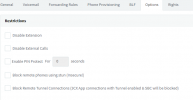
I cant find the location were I can dis or enable the "Disallow use of extension outside the LAN" in the latest version 18.o update 7. I want to register a extesion from the outside but this is not working due the block Wan request. In the older version you could select it in the options tab in the extensions, but not anymore in version 18

Who knows.
1687956659864.png 1687956686935.png
 
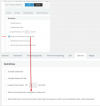
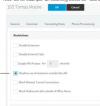
I believe the setting you are looking for was renamed for clarity to "Block remote phones using stun (Insecure!)".
 
  • Like
Reactions: Kevin@voxtelesys
I believe the setting you are looking for was renamed for clarity to "Block remote phones using stun (Insecure!)".
Nathan,

I have one extension operational with a remote phone ( configured in the old version) and this new extension. Settings for Block remote phones using stun are the same, but still get the block on WAN in the log.
 
Check its not in the blacklisted IP list.
 
I have added the IP to the white list. ( If its in the black list then is doesn't shows up in the log file as Block on Wan.)

I have an extension which on the same external network is operational thru the wan. I think its a setting somewere within the exension configuration.
 
  • Like
Reactions: Nathan@Voxtelesys
This has simply been renamed.
1691504898123.png
 
Status
Not open for further replies.

Latest Posts

Members Online Now

Forum statistics

Threads
111,832
Messages
589,278
Members
164,662
Latest member
DejanMDS