"Break times" In Admin Console "Configure Office Hours" Not honored in v18.0 (Build 908)

Status
Not open for further replies.

snydertech

Bronze Partner
Basic Certified
Joined
Nov 15, 2020
Messages
7
Reaction score
2
I just noticed that the Break Times settings are not being honored on version v18.0 (Build 908). Unfortunately I had a client bring it to our attention. I read in another forum someone found a "new" Office Hours pane in the new admin dashboard in the web console but when I checked it, it's completely blank. Are all the Office Hours settings to be migrated manually to this new settings pane in the web console or what? The system seems to still be honoring the main "Office Hours" settings, just not "Break Times".
 
Hi,

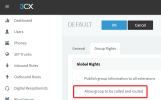
Edit your Group and check if this option was turned on:
1679044355561.png

This means that your Group Office hours (controlled via Web Client Admin) are now in effect, overriding the global office hours.

The first time you modify anything in the Webclient Admin Group Settings, this will become enabled.

If the Group has no breaks defined from here, then you won't have any breaks.


Please take some time to try out the new Groups features we introduced. This is a very powerful featureset which allows you to manage different groups independently, overriding the global settings:

- They can have different time zones
- They can have different office hours and breaks
- They can also have different holidays
- And their own custom IVRs with separate call / messaging routes
 
Last edited:
Do you have a link to where are the new groups functions explained? Specifically the office hours and holiday routing?
 
Status
Not open for further replies.

Forum statistics

Threads
111,974
Messages
590,081
Members
164,899
Latest member
mazet