Solved Bridge two 3CX PBX

Status
Not open for further replies.

siscom

Customer
Basic Certified
Joined
Jul 14, 2009
Messages
237
Reaction score
37
Good Morning Colleagues
I hope you are doing good . I have an issue with 3CX bridges that i need to share with you . Let me first give you overview on my setup:
  • Master Bridge:
    • IP Address: 192.168.1.71
    • 3CX Version: 16
    • Extensions: 1xx
  • Slave Bridge:
    • IP Address: 192.168.1.51
    • 3CX Version: 16
    • Extensions: 2xx
  • The two 3CX systems located in the same LAN.
  • No outbound prefix configured.
  • Outbound rules configured correctly
  • Presence has been configured correctly where IP Phones connected to master bridge can see the extensions connected to the slave bridge and vice versa.
  • IP Phones connected to slave bridge can call IP Phones connected to master bridge and vice versa.
Below is the issue:
  • When IP Phones connected to Master Bridge calls IP Phones connected to Slave Bridge , The calling Name and the Calling Number displayed correctly to IP Phone connected to Slave Bridge.
  • When IP Phones connected to Slave Bridge calls IP Phones connected to Master Bridge , The calling Name displayed correctly but only the last digit from the calling number displayed. For Example , When 205 call 103 , What displayed as calling number to 103 is 5 instead of 205.
  • I checked the activity log at Master Bridge and i can see that the full calling number received (205).
So do you have any idea what is the root cause and the solution to this issue?

Best Regards
 
If the full caller ID is shown as being received, in the log, then it should be displayed. What type of devices are you using? All the same? Do you happen to modify caller ID for external calls? Just wondering if that might be the issue.
 
Good Morning Leejor
Thx for your replay . Kindly find my below notes:
  • I am using 2 devices. The first one is Planet IP Phone and the other is 3CX Softphone V16 for windows 10.
  • I can check if caller ID for external calls has be modified but appreciate to let me know where to check.
Thanks in advance

Best Regards
 
I recall some CID problems in the past, where a leading 1 was causing issues on Bridge calls, but I think we are now past that, with recent updates. Incoming caller Id is usually manipulated using this..

https://www.3cx.com/docs/cid-reformatting/

But would have to be configured per trunk group, and I'm not sure that Bridge trunks are included as there are a lot fewer options available.

Can you post an incoming call log (Activity Log) showing the caller ID.

If I may ask, what is the reason for the two PBXs, on the same LAN, rather than combining all into one .
 
  • Like
Reactions: Evolute IT
Good Morning Leejor
Thx for your replay .Indeed , bridge trunk has only one option to modify Display Name only.

I am attaching with my message the below:
  • Activity log for calling number 205
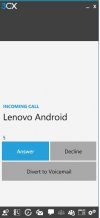
  • Snapshot from 3CX SoftPhone showing that the incoming calling number is 5 not 205
The scenario is being tested in my lab and that's why the two PBXs in the same LAN.

Best Regards
 

Attachments

While I do see a "205" here..

03/16/2021 12:10:11 AM - L:15.2[Extn:103] has joined to L:15.1[Line:30000<<+205]

I see a 5 here...

To: <sip:[email protected]>;tag=cebf8ef78db045e6bec02095a95eb6b2
From: "Lenovo Android" <sip:5@192.168.1.71:5060;nf=b>;tag=48728855

You might want to check the originating PBX logs.
 
Good Morning Leejor
Thx for your valuable note . Attached is the activity log from the originating PBX filtered by called number 103.

Thx in advance.

Best Regards
 

Attachments

Everything seems to look "normal" in that log, with 205 where is should be. There has to be something in the terminating PBX that is removing the two digits. Is it always 20 that is removed?. If you created an extension that was numbered 123, for example, in the originating PBX, is the 12 removed? In other words, is it two digits removed, or is it a two and a zero being removed?
 
  • Like
Reactions: siscom
Hi @siscom

Are you sure that no prefix is configured at either side of the bridge? Also are you stripping any digits in your outbound rule?
Also in a unrelated note, upgrade your systems to the latest stable V16 since you are doing tests. You should test with the latest supported version.
 
Good Morning Colleagues
I hope you are doing good . Thanks for your suggestions . I did what Leejor adviced by creating other extensions 3xx , 4xx and it worked as expected. It seems there is an issue with extensions 2xx. Let me do some investigations and will let you know the results.

Thanks colleagues and special thanks to Leejor.

Best Regards
 
Good Morning Colleagues
I have done some investigations and i would like to share with you the below:
  • I have created extensions 21x and it worked as expected.
  • It seems that that issue only in extensions 20x.
  • The only root cause from my point of view that the country code is striped from SIP trunk (Note: I am located in Egypt and our country code is 20) and that's why when extension is 20x , 20 stripped and only x displayed to remote IP Phone.
Kindly let me know if indeed country code is stripped from SIP trunk or my analysis is wrong and there is another root cause for this issue.

Best Regards
 
If, as you suspect, the 20 is being stripped because it is your country code, then that suggests that the same thing may be happening on other incoming calls, and that that behavior, is something, normally desired on other trunks.

Is that the case?

Have a look at this. It deals with a similar issue, but because the E164 "rules" are dealing with North American numbers, in this case, as national, a 1 is removed.

https://www.3cx.com/community/threads/digit-1-is-automatically-stripped-between-bridges.61452/
 
Last edited:
Good Morning Leejor
Thx for your replay , It didn't happened before that we try to pass extensions 20x over bridge (either with 3CX system or other third party IP PBX).

But based on the link you shared , It is clearly that the problem in country code so in future i will avoid using extensions 20x over trunks.

Many thanks Leejor for your always support.

You can close the case now.

Best Regards
 
  • Like
Reactions: YiannisH_3CX
Check your E164 rules and they are configured in the PBX. You can find them under settings / E164 Processing.

You can disable it completely as a test and reconfigure it later if needed.
 
Status
Not open for further replies.

Latest Posts

Forum statistics

Threads
112,324
Messages
591,897
Members
165,475
Latest member
lastshadow