Build a High Speed Transcription Rig

LeonidasG_3CX

Product Manager
Staff member
Joined
Nov 19, 2008
Messages
2,170
Reaction score
629

How to build a high-performance transcription rig in-house.​

In the current ecosystem - defined by advancements in artificial intelligence - technology-focused businesses are increasingly and aggressively pursuing the integration of AI into their operations. Some chose to outsource their AI workloads, either by sending their data directly...
Continue reading the Original Blog Post.
 
Leonidas, great article on how to build an Ai transcription rig at home. Really appreciate it as I am in the process of doing something similar. I do have some questions. One, you talk about hardware but how about software? It would be great to see how one can configure OS and the rest to be able to use it for 3CX transcription. Also, we host 3CX ourselves with Azure, do you think it would be a good idea to host the transcription machine on our network? We definitely are looking to do something as the costs of transcription with ChatGPT and Google for the volume of recordings we do is quite prohibitive for our small operation.
 
Great post!!! I love Asus TUF graphics cards and cases btw...
 
Hello everyone,

We are provisioning a new HPE server to host our 3CX Transcription Engine environment. We currently operate on a 512 SC license and have a very high volume of call transcriptions. We need to select the right NVIDIA accelerator to handle this specific workload efficiently without over-provisioning.

Here are the HPE-certified options we are evaluating:

  • S2L70C - NVIDIA L40S 48GB PCIe Accelerator
  • S0K89C - NVIDIA L4 24GB PCIe Accelerator for HPE
  • S5T74C - NVIDIA RTX A1000 8GB PCIe Accelerator for HPE
  • S6A73C - NVIDIA RTX PRO 6000 Blackwell Server Edition 96GB PCIe Accelerator for HPE
  • S6W21C - NVIDIA RTX PRO 6000D 84GB PCIe Accelerator for HPE


    Based on actual deployment data, which of these GPUs offers the best price-to-performance ratio specifically for processing at the 500+ SC scale?

    Thanks!

 
  • Like
Reactions: NatalyS_3CX
I assume i'm missing something here.
In the requirements it says "Nvidia 24GB RTX GPU".
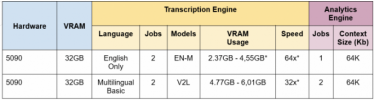
However in the benchmarking table usage is under 8GB
1773872818486.png
Meaning technically speaking an 8GB GPU should work, am I looking at this right?
 
No you are not. The hardware requirements are written there clearly .
 
No you are not. The hardware requirements are written there clearly .
So VRAM Usage in the table above is not related to the size of the Model?
If not, what is it referring to?
 
I do have some questions. One, you talk about hardware but how about software? It would be great to see how one can configure OS and the rest to be able to use it for 3CX transcription.
Hi,

With regards to software for the 3CX Transcription on-prem server, these must be installed exactly as per our published guide:
https://www.3cx.com/docs/transcription-engine-server/

We have also published a short video walkthrough of that guide:
 
  • Like
Reactions: kseba77 and jed
So VRAM Usage in the table above is not related to the size of the Model?
If not, what is it referring to?
We have tested with lower VRAM cards, below 24 it will not work with the speed+parallelism and reliability required for an Enterprise solution.

And yes, it will not just be the model size but also the audio that needs to be loaded etc. Without getting into details that can easily be found online, unless you are a tinkering hobbyist you need at least the minimum recommended spec.
 
  • Like
Reactions: Evolute IT
Leonidas, great article on how to build an Ai transcription rig at home. Really appreciate it as I am in the process of doing something similar. I do have some questions. One, you talk about hardware but how about software? It would be great to see how one can configure OS and the rest to be able to use it for 3CX transcription. Also, we host 3CX ourselves with Azure, do you think it would be a good idea to host the transcription machine on our network? We definitely are looking to do something as the costs of transcription with ChatGPT and Google for the volume of recordings we do is quite prohibitive for our small operation.
@kseba77
One, you talk about hardware but how about software? It would be great to see how one can configure OS and the rest to be able to use it for 3CX transcription
You make a good point, something as simple as installing the drivers and other dependencies correctly on Linux can sometimes become an hours long task even with the help of ChatGPT which had often lead me personally astray with the incorrect way to install things.

Also, we host 3CX ourselves with Azure, do you think it would be a good idea to host the transcription machine on our network?
So, the minimum Nvidia L4 will set you back ~$600 a month. In 12 months you'd have paid $7200
For the same and actually less money you can set your self up a PC that does it on premise for you.

Truly, you can downscale the setup in the blogpost a bit and get it cheaper.
 
  • Like
Reactions: Evolute IT
I assume i'm missing something here.
In the requirements it says "Nvidia 24GB RTX GPU".
However in the benchmarking table usage is under 8GB
View attachment 51261
Meaning technically speaking an 8GB GPU should work, am I looking at this right?

That's not the case. I have a 1080 Ti 11GB sitting here wishing it could be used. It's not going to work for the following reasons.

The 3CX AI Engine runs several models in tandem to produce a result. We run approximately 4-5 models. The total minimum need of these models together is around 21GB which is why an L4 with 22.6 ish GB is barely the minimum but ones with 20GB are not a good pick.

Also if you notice the 64k context in the diagram, this implies that 64k context = 32GB of vRAM.
You can't use an 8GB, 16GB or 20GB card.
 
That's not the case. I have a 1080 Ti 11GB sitting here wishing it could be used. It's not going to work for the following reasons.

The 3CX AI Engine runs several models in tandem to produce a result. We run approximately 4-5 models. The total minimum need of these models together is around 21GB which is why an L4 with 22.6 ish GB is barely the minimum but ones with 20GB are not a good pick.

Also if you notice the 64k context in the diagram, this implies that 64k context = 32GB of vRAM.
You can't use an 8GB, 16GB or 20GB card.

@LeonidasG_3CX
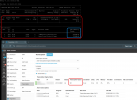
I've loaded up my transcription server with some prior call recordings for transcription - does this GPU memory consumption look correct, or should it be consuming more memory, loading additional models?

Quadro RTX 6000 w/ 24GB

1774549881363.png
 
Max conversions 4 is indeed typical for a 24Gb VRAM GPU.
 
@LeonidasG_3CX
I've loaded up my transcription server with some prior call recordings for transcription - does this GPU memory consumption look correct, or should it be consuming more memory, loading additional models?

Quadro RTX 6000 w/ 24GB

View attachment 51328

Looks correct. The second model is only loaded but not in use at the time of the screenshot. Once its actually in use it'll use a lot more memory.
 
Looks correct. The second model is only loaded but not in use at the time of the screenshot. Once its actually in use it'll use a lot more memory.
Sent you a PM.
 
Did anyone try to use Inet ARC for transcription in 3CX? I am looking at the ARC Pro B70 with 32BG of VRAM but I am not sure if it will work for this setup.
 
Wait a few weeks for the Mac Mini transcription service. Or just buy a Mac Mini now as they are in short supply. With 24 Gigi ram or whatever you can find. The more memory the better.
 

Members Online Now

Forum statistics

Threads
111,834
Messages
589,287
Members
164,663
Latest member
svdDGS