





How to build a high-performance transcription rig in-house.
In the current ecosystem - defined by advancements in artificial intelligence - technology-focused businesses are increasingly and aggressively pursuing the integration of AI into their operations. Some chose to outsource their AI workloads, either by sending their data directly to organizations like OpenAI for data processing, whilst others are more comfortable building small powerhouses in their own space to handle those workloads, whatever they may be.
This blog focuses on the latter, looking at how you can build a high-performance transcription rig in-house that can also be used for other purposes, like model training or tuning in the future.
The Star of This Build
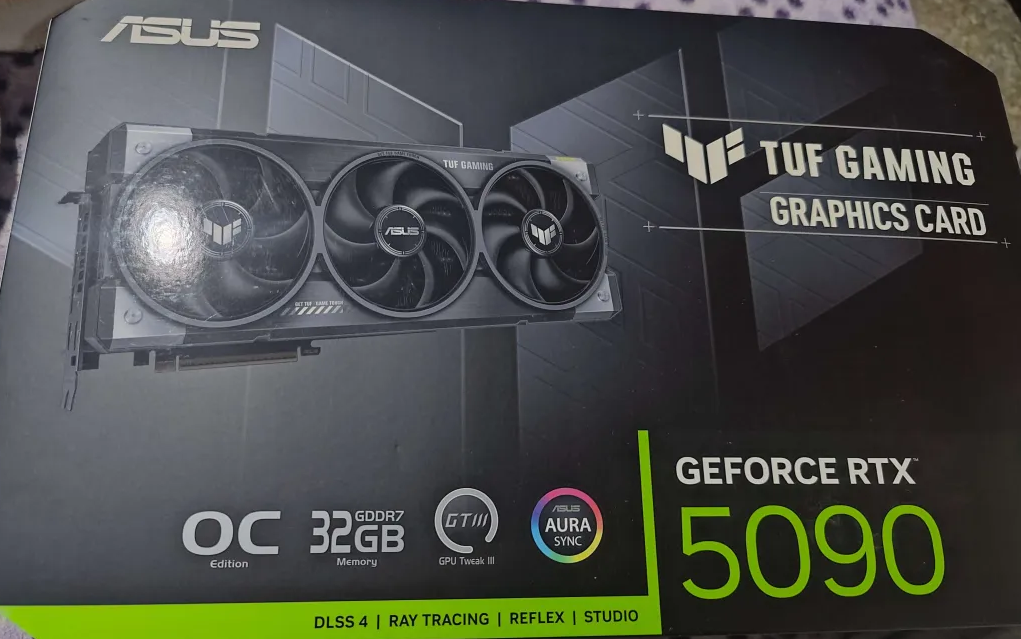
We selected the Asus TUF 5090 32GB OC Edition. We chose the Asus TUF series for its known reliability and longevity. Even if we had to choose again, we would still pick this card over variants that the internet debates are faster. This variant costs around $3900, which is significantly less than most other variants, and the actual speed difference for inference is negligible. It's not worth spending an extra $500–$1000 for a marginal 1-3% more performance!
Why a High-Performance AI PC for 3CX?
The 3CX Onboard AI solution allows businesses to run transcription models locally, significantly enhancing data privacy and offering better control over processing capacity. If you’re a business that needs transcription done close to real-time, and has a lot of calls to go through, you’re going to need a high speed rig like we’re building here.
Rig Components
- Graphics Card: ASUS TUF Gaming GeForce RTX 5090 OC Edition 32GB GDDR7 (Nvidia RTX 5090, PCIe 5.0) - $4140
- High-Speed SSD (OS/Primary): Samsung 9100 PRO NVMe M.2 4TB (PCIe 5.0, 14800MB/s Read) - $620
- Processor: Intel® Core™ Ultra 9 Desktop Processor 285K (24 Cores, up to 5.7 GHz) - $568
- RAM: 1 x 48GB (2x24GB) DDR5 6000Mhz Corsair Dominator Titanium RGB Intel XMP (CMP48GX5M2B6000C30) - $1420
- Power Supply: CORSAIR HX1200i (2025) 1200W ATX 3.1 & PCIe 5.1 Compliant (Fully Modular, Platinum) - $259
- Motherboard: ASUS TUF Gaming Z890-PRO WiFi (Intel LGA 1851, ATX, PCIe 5.0, DDR5, WiFi 7) - $315
- CPU Cooler: Noctua NH-D15 G2 chromax.black (Premium Dual Tower) - $189
Total: $7,511
Now some of you may already be seeing this price tag and thinking, “Hey, why don't I just buy a DGX Spark by Nvidia? It’s cheaper.” But, you’d already be on the wrong train of thought thinking like that!
Whilst the DGX Spark and similar all-in-one solutions are advertised as blazing fast - and admittedly have great marketing behind them, they’re 3-6 times slower in transcribing calls than the rig we’ve just built. The DGX Spark and similar solutions don’t have dedicated GPU memory and instead share RAM memory with the rest of their system. Whilst this has the benefit of being able to have more memory than normal, to its detriment it’s slower.
Downspeccing for Further Cost Savings
In regards to this rig specifically, admittedly, some of the hardware is a bit overkill. For example, the amount of RAM can be lowered to 16GB as we’ll be using the GPU vRAM for inference tasks instead of the regular RAM. Additionally if you’re wanting to save another $100, you can drop from the 9100 PRO NVMe to the 970-990 PRO series from Samsung. A less beefy CPU will also do like a Core Ultra 5 245K / 250K.
Truly though as long as the 5090 is there, the rest can be down-specced by quite a bit with the exception of maybe the power supply. You could save about $1k on downspeccing this kind of server.
Build Images
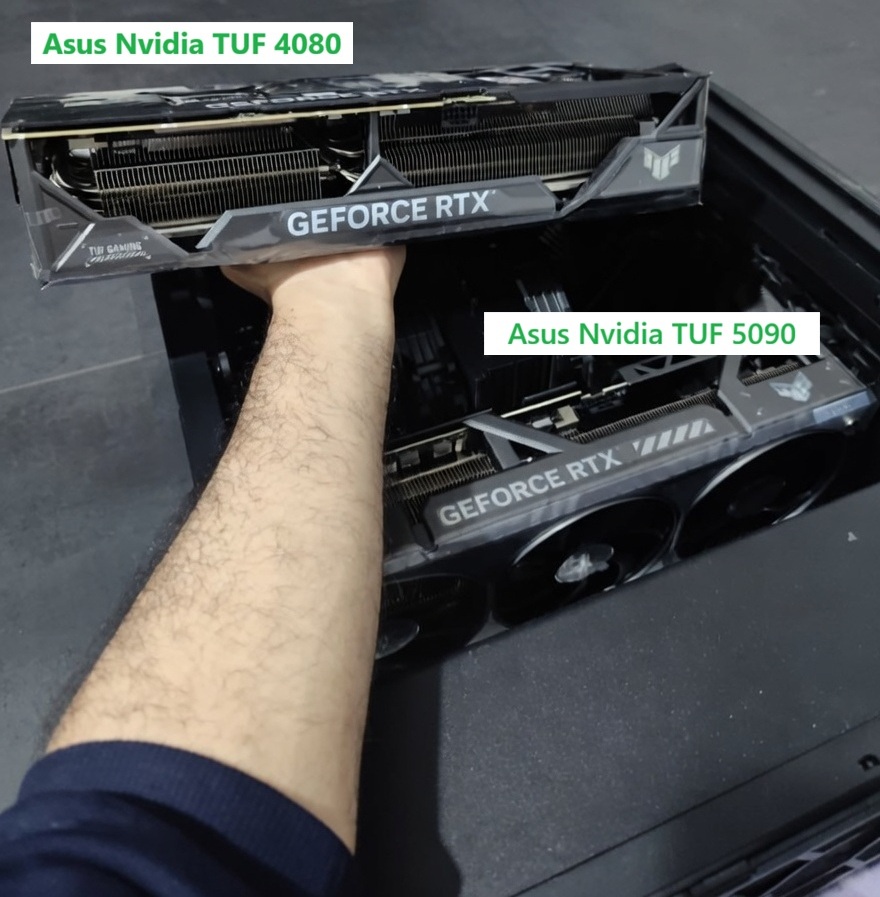
In the image above is a comparison of an Asus TUF 4080 RTX 16GB OC vs an Asus TUF 5090 RTX 32GB OC side by side. These GPUs both weigh close to 3KG and are almost as large as one’s forearm. If you’re planning on buying a high end RTX series Nvidia GPU to build your own custom rig, ensure you check if the accommodating case you’re buying will actually fit. Clearance is almost always an issue with these high end GPUs.
Performance?
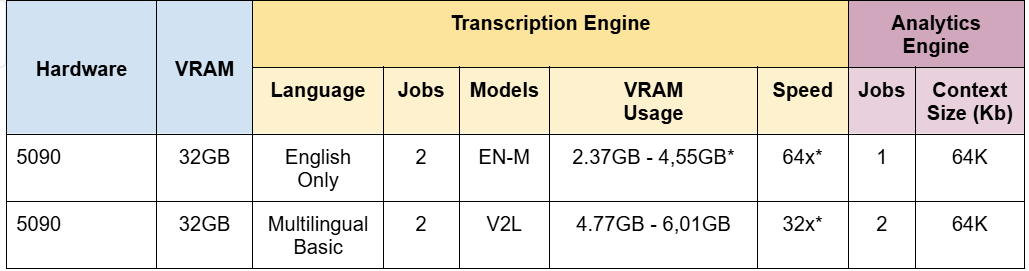
The transcription performance of such a rig can be anywhere between 32x to 64x live transcription speed, meaning if you have recordings to be transcribed that are 32 to 64 seconds long, transcription will take around 1-2 seconds and some overhead related to model load speed and other factors.
Don’t forget of course there’s a second pass of AI analysis of the resulting transcription that may take several seconds more depending on the length of the transcript. The rig can handle between 32-64k tokens worth of context which roughly translates to 4 hours worth of conversation context. This means even the longest 3-hour 3CX calls will have their full conversation context taken into consideration when performing call analysis.
Below are more details on the performance tests from our internal benchmarks:
Conclusion
We’ve gone ahead and built a high-throughput AI workstation. For organizations using the 3CX Phone System and its Onboard AI feature, this build represents the pinnacle of local processing power whilst balancing cost and ensuring call transcribing is done fast, accurately and kept securely within your network.
Ready to see how fast you can transcribe calls?









 Copyright © 2026