Bulk Ext Import

Status
Not open for further replies.

jcostlow

Gold Partner
Advanced Certified
Joined
Jul 11, 2020
Messages
396
Reaction score
152
Hi everyone,

I am working on getting a new system ready for migration and wanted to bulk import the extensions since there are 241 extensions to put in.

I am following the guide at: https://www.3cx.com/docs/bulk-extension-import/ and have 100 extensions in the csv at this time.

These fields are populated in the file: number, first, last, email, auth id, auth pass, pin, deskphone web pass

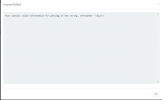
When I go to import I get the following error but it doesn't tell me what line the problem is at
Capture.PNG
 
You are correct, it doesn't. It could be any number of things. Usually I key in an extension manually and then export it for reference. Are you using a RNG source for the auth info?
 
I made my test extension and exported the file like you mentioned for a template. I would like for 3CX to generate the auth info but just made something up since the guide said it is a required field.

I was hoping to allow it to regenerate auth once imported by manually telling it to do so for all exts.

I am going to play with the file some as I left the other fields completely blank that weren't required and wonder if it expects data in all fields. Capture1.PNG
 
I got the import to work. I wound up filling in most fields like below and it imported 101 extensions. I then went back and told it to regenerate all credentials.

Number,FirstName,LastName,EmailAddress,MobileNumber,AuthID,AuthPassword,WebMeetingFriendlyName,WebMeetingPrivateRoom,ClickToCall,ClickToCallFriendlyName,WebMeetingAcceptReject,EnableVoicemail,VMNoPin,VMPlayCallerID,PIN,VMPlayMsgDateTime,VMEmailOptions,QueueStatus,OutboundCallerID,SIPID,DeliverAudio,SupportReinvite,SupportReplaces,EnableSRTP,ManagementAccess,ReporterAccess,WallboardAccess,TurnOffMyPhone,HideFWrules,CanSeeRecordings,CanDeleteRecordings,RecordCalls,CallScreening,EmailMissedCalls,Disabled,DisableExternalCalls,AllowLanOnly,BlockRemoteTunnel,PinProtect,MAC_0,InterfaceIP_0,UseTunnel,DND,UseCTI,StartupScreen,HotelModuleAccess,DontShowExtInPHBK,DeskphoneWebPass,SrvcAccessPwd,VoipAdmin,SysAdmin,SecureSIP,PhoneModel14,PhoneTemplate14,CustomTemplate,PhoneSettings,AllowAllRecordings,PushExtension,Integration,AllowOwnRecordings,RecordExternalCallsOnly,DID,SMS

1041,Selma,Reception,[email protected],,u4f2mf62,d7%3jfmq*,,0,0,,0,1,1,0,1234,0,0,0,,,0,1,1,0,0,0,,0,0,0,0,0,0,0,0,0,1,0,,,,1,0,0,,,,Fuc4323J,axg9hh,0,0,0,,,,,,,,,,,
 
  • Like
Reactions: jed
It's been on my to-do list to document it because there's definitely fields that are required but aren't marked as such on the directions.
 
Well I got all extensions added... I do have one issue with it though. I had went into Settings >> Email >> Notifications and unchecked Notify user when extension is created but it appears regenerating the credentials made it send notifications.

I was not ready for it to send credentials as we are still waiting for AT&T to start the order for converting our IP Flex with BVOIP from a PRI hand off to a SIP trunk hand off.

I know I will be getting tons of questions on Tuesday ;) since management approved getting 3CX but nobody else was aware yet.
 
There's a checkbox when you regenerate to send credentials so I'm guessing you had that checked by accident.
 
  • Like
Reactions: jcostlow
I went and chose to regenerate credentials but canceled and see that I did miss that :eek:

Thanks for your help and I will remember the regenerate credentials box having the option to email credentials going forward.
 
Status
Not open for further replies.
