Call back for Call queues

Status
Not open for further replies.

CConnect-cx

Free User
Joined
Mar 13, 2021
Messages
8
Reaction score
1
Hi..
I'm looking for some help to configure the callback feature on the 3cx.
I can't find a good document describing it.
Thanks.
 
Hi @CConnect-cx,

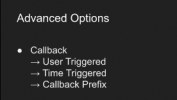
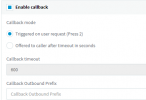
In the call queue, click Advanced and enable the Call Back feature. The options are:

1615801147683.png
 
Thanks @VasilisV_3CX ..
But how do I trigger the call back. Is there an additional step? If so, where and do you have some example screenshot?
Also note, the callback will only stay in queue for as long as your queue wait maximum. That being said lets say your queue has a 90 second maximum for normal calls and a call back is issued. What will happen is the call will be placed in Queue as a call back once the next available agent is available. Lets say that agent doesn't change status or log out of the queue and needs to run to the bathroom it will then ring that agent for 90 seconds on the call back causing a missed call back. In my environment I could see disaster with it as it's hard enough to get people to remember changing status as well as the softphone sometimes keeps users away forever and without habit they will miss that there set to away.

I wish the Queue call back had a different timeout logic, but I understand why it is the same as it technically puts the caller in the queue for the call back for that amount of time. If you have a longer queue wait time or just an army of people answering phones where shorter waits between calls is doable I could see this working with a short queue time.
 
That is why for Callbacks we have 2 'trigger' options. Generally if your Maximum Queue Wait time is 90 seconds, there is no point in having callback enabled.

Idea #1:
Set the Max Queue Wait time to something larger, like 10-15 minutes, then set the callback to 90 seconds.

Idea #2:
If you want to keep the Max Wait Time at 90 seconds, disable callback completely. Then build your own Call Flow Designer App that prompts external callers for their "Callback number" and then sends this information to an email distribution group that contains the Queue Agents emails.
The use-case of this would be to set the "Destination if no answer" of the Queue to the Call Flow App.
 
I offered up idea #1 to management and they didn't like it, but I did as it's super simple and some people would rather wait for that trust factor.

I didn't think of Idea #2 but that is an awesome idea. Thanks Nick!
 
  • Like
Reactions: NickD_3CX
That is why for Callbacks we have 2 'trigger' options. Generally if your Maximum Queue Wait time is 90 seconds, there is no point in having callback enabled.

Idea #1:
Set the Max Queue Wait time to something larger, like 10-15 minutes, then set the callback to 90 seconds.

Idea #2:
If you want to keep the Max Wait Time at 90 seconds, disable callback completely. Then build your own Call Flow Designer App that prompts external callers for their "Callback number" and then sends this information to an email distribution group that contains the Queue Agents emails.
The use-case of this would be to set the "Destination if no answer" of the Queue to the Call Flow App.
I like Idea#2.
 
Status
Not open for further replies.

Latest Posts

Forum statistics

Threads
112,324
Messages
591,897
Members
165,476
Latest member
awan05