Call drop after 15 minutes

Status
Not open for further replies.

GiannisA

Forum User
Advanced Certified
Joined
Dec 18, 2020
Messages
27
Reaction score
2
Hello all,

When i have an inbound call for more than 15 minutes, it's getting dropped. The license we have for 3CX is Professional Perpetual 16.0.619.
SIP inspection is disabled in FirePower.
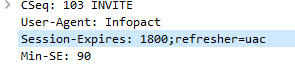
I have seen in old posts that the server sends an INVITE and the Session-Expires field is configured for 15 minutes.

Can you please let me know how to extend the Session-Expires field?

I can provide, if necessary, a capture from a call that was dropped after 15 minutes and a Firewall check from 3CX.

Thank you in advance
 
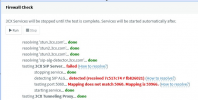
Is your firewall check passing on all ports?
 
Yes, it is passing all the ports that we have opened, but these are for RTP packets.
Is it possible to relate it with the issue i have ?
 
3CX Version: Professional Perpetual 16.0.619
Server OS: Microsoft Windows Server 2008 R2
Is the 3CX Server Hosted and where? It is hosted locally on our site
IP Phone Make/Model/Firmware: Different IP phones and softphones
Provisioning Method: Local
Trunk Provider or Gateway Make/Model: KREUZE/FRAME21
Has the Firewall Checker passed: NO
Are custom Phone Templates being used: YES

1610363443561.png
 
I would sort your network out so the firewall is passing 100% before troubleshooting further.
 
  • Like
Reactions: AWS2P
It seems related to your screen copy, that you have SIP ALG enabled, and this has to be disabled to avoid unpredictible problems
 
How can i disable SIP ALG?
SIP inspection is disabled in Firepower.
 
If you run

show run policy-map | beg global_policy

Does inspect SIP show in the list?
 
No, it doesn't because i had disabled when i installed FP.
Actually, if the SIP inspection was enabled we would have problems like one way audio, in every call.
Now the issue is in the calls that last more than 15 minutes

firepower# sh run policy-map
!
policy-map type inspect dns preset_dns_map
parameters
message-length maximum client auto
message-length maximum 512
no tcp-inspection
policy-map type inspect ip-options UM_STATIC_IP_OPTIONS_MAP
parameters
eool action allow
nop action allow
router-alert action allow
policy-map global_policy
class inspection_default
inspect dns preset_dns_map
inspect ftp
inspect h323 h225
inspect h323 ras
inspect rsh
inspect rtsp
inspect sqlnet
inspect skinny
inspect sunrpc
inspect xdmcp
inspect netbios
inspect tftp
inspect icmp
inspect icmp error
inspect ip-options UM_STATIC_IP_OPTIONS_MAP
class class-default
set connection advanced-options UM_STATIC_TCP_MAP
flow-export event-type all destination xxx.xxx.xxx.xxx
!
 
I think maybe the best course of action here would be to contact your Firewall vendor.
What you can do is start a packet capture on the Firewall on the LAN and WAN interface.
Then compare the packet from port 5060 on both LAN and WAN, they should be identical (it will look like a SIP packet).
 
So, do you believe that Firewall is malfunctioning and it performs SIP inspection ?
 
"malfunctioning" is a hard word so I don't know if I would use that, but I think it is pretty clear the the Firewall is doing something to the packets, and specifically 5060 it seems.

Some Firewalls have multiple security options, e.g. you may have SIP ALG, but also another called "Source Port remapping" which again may cause such issues.

The reason I suggest the packet capture is so that if you do contact your Firewall vendor, you have something to show them so they can better understand.
 
  • Like
Reactions: GiannisA
Is the value "Session-Expires" configurable on 3cx ?
The below is from a capture in which the call was dropped after 15 minutes

1610375342874.png
 
Is the value "Session-Expires" configurable on 3cx ?
No, it isn't but, this is usually defined by the other Party and the default value is 1800.
First things first though, you need to figure out what is happening with the Firewall Checker because it is very likely that is what is causing the problem.

No point in checking other things until that is sorted out.
 
I had a call with Cisco support and the engineer confirmed the above, that SIP inspection is disabled.

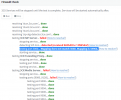
The below error, "Mapping does not match 5060. Mapping is 59966." , what does exactly mean ?

1610440358491.png
 
Hi Yianni,

We checked it with Cisco support and FW doesn't remap the ports
The port mapping is the same config as every other site we have 3cx

UDP:3478, 5060, 5090, 9000-9127
TCP:5001, 5060, 5090

Isn't it strange that the calls are working fine for 15 minutes and then it's getting dropped ?

If FW was inspecting SIP protocol or remapping 5060 to 59966, it should do it from the first packet.

Is it possible that this could be a bug of the platform ?
 
Is it possible that this could be a bug of the platform ?
Very unlikely.

Isn't it strange that the calls are working fine for 15 minutes and then it's getting dropped ?
Not really, with supported providers, during the interop process we run into such issues, but by the time we have sorted everything out in the template, this things don't happen.

We checked it with Cisco support and FW doesn't remap the ports
Ok, then why does the Firewall Checker claim that the SIP messages are being altered somehow? Did you follow my advice with the packet capture?
I will extend an offer, start a packet capture on the Firewall on both LAN and WAN interfaces, then start the Firewall checker and let it run all the way through. Stop and export the capture, upload it to a file sharing service and send a download link via PM.

I will make sure that the results of the Firewall Checker are accurate,
 
I have provided the requested captures in PM
 
Status
Not open for further replies.

Latest Posts

Forum statistics

Threads
112,324
Messages
591,897
Members
165,475
Latest member
lastshadow