Call flow assistance out of the box or CFD needed?

OrloOneGM

Gold Partner
Advanced Certified
Joined
Sep 19, 2024
Messages
10
Reaction score
1
I have a client that has two receptionists that want to be able to answer a call, and if another call comes through put the current caller on hold deal with the new caller, then return to the existing call.

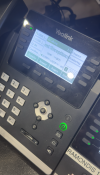
I had suggested using a queue and this was tested, but they didn't like the callere waiting in the queue without receptionist to answering the call first. I then configured the queue (and the users to allow multiple calls), but you can see the mess on the screen (ignore phone number obfuscation) causing confusion to the receptionist.
phoneissue.png

I then tried a ring group but if all members of the group are busy it overflows rather than allowing the reception to hold the current call.

It seems like they want to mimic the old PSTN style of lines with a line hunt where they see the next call on the next line.

Is there a way to configure this request without using a CFD? Am I overthinking a simple solution?

Regards,

Greg
 
You may be more interested in using Shared Parking instead of using the HOLD.

Less traffic on the phone, less clutter.
 
You may be more interested in using Shared Parking instead of using the HOLD.

Less traffic on the phone, less clutter.
Thanks for your response. I have suggested we use shared parks for the secondary part of placing the call on hold. Are you able to automatically direct a call to a shared park without interaction?
 
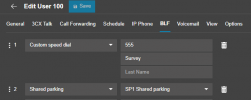
They would need to press the SPx button. Just like they would for HOLD.

1747807952024.png

It would create the key on their phone. It would also light up red showing that there is a call there and they can retrieve it when they service the other call.
 
Unfortunately, the client is in the old paradigm of, picking up a line and asking the caller to "please hold" to do the same with the next line until all are on hold then working through the lines one at a time.

While I have set them up to use queues and this has worked, they wanted to be able to answer a call when it comes in rather than have them queued. This is why I enabled 'Target agents already on a call', but this caused the display of the phone to act strange and confused the receptionists thus I have disabled this.

I have suggested using the Wallboard or Panel on a separate screen so that queued calls are visible, so I am hoping that they can use this with shared parking and stick with the queues as this seems to make the most sense.

I am open to other suggestions if anyone has any better ideas.
 
Hi,
Would a queue with a custom prompt of one of their receptionists just saying "please hold" not be enough? To the caller the experience would be identical after all.

Best,
K.
 
Unfortunately, the client is in the old paradigm of, picking up a line and asking the caller to "please hold" to do the same with the next line until all are on hold then working through the lines one at a time.

While I have set them up to use queues and this has worked, they wanted to be able to answer a call when it comes in rather than have them queued. This is why I enabled 'Target agents already on a call', but this caused the display of the phone to act strange and confused the receptionists thus I have disabled this.

I have suggested using the Wallboard or Panel on a separate screen so that queued calls are visible, so I am hoping that they can use this with shared parking and stick with the queues as this seems to make the most sense.

I am open to other suggestions if anyone has any better ideas.
The customer wouldn't know the difference. They would still be listening to the music on hold.

For the receptionist, it is just a different button on the phone. Instead of HOLD they press the SPx. This way they can have multiple people on hold ( The PBX can go up to 1000 Shared Parking spots, dependent on your subscription obviously).
 
I concur with @NicholasP_3CX and there are additional benefits to the "park" approach. For one, when you place calls on "hold" there is no way of reporting how much time customer's spent on hold. But we can track how long people have been placed on park. Further, you can configure calls in park to remind you that a call is waiting and I don't think that is possible with a traditional hold.

Also, keep in mind that you can designate a unique park location for each user so when they press the designated BLF, it is pointed to their personal park location. That way you do not have reception 1 picking up reception 2 calls by mistake. Finally, reception 2 cannot grab a call on reception 1's hold location, but they can pick up a call from the other receptionists park location.

Let me offer this advice -- our jobs as IT/phone professionals is to help customers see the benefits of doing old tasks in newer better ways. From the perspective of the receptionist and the caller there really is no difference between placing a call on hold vs park, but "park" comes with a lot of benefits. As noted by @NicholasP_3CX whether hold or park the process is EXACTLY the same, it is just a different button.
 

Latest Posts

Forum statistics

Threads
111,962
Messages
589,995
Members
164,867
Latest member
swegner