- Joined
- Apr 27, 2023
- Messages
- 3
- Reaction score
- 0
Hello,
We are using an enterprise hosted subscription via 3cx partner.
I have a call flow configured with below timings and need to additional timings for date range and for a specific month, not sure how to append it with current timings:
Current timings and later:
M-F: 8:30 to 17:00
Sat : NA
Sun: NA
Xmas week timings: 25th to 31st
M-F: 8:00 to 18:00
Sat : NA
Sun: NA
Jan 2024 timings:
M-F: 8:00 to 18:00
Sat : 9:00 to 13:00
Sun: NA
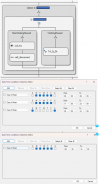
Existing config screenshot -
We are using an enterprise hosted subscription via 3cx partner.
I have a call flow configured with below timings and need to additional timings for date range and for a specific month, not sure how to append it with current timings:
Current timings and later:
M-F: 8:30 to 17:00
Sat : NA
Sun: NA
Xmas week timings: 25th to 31st
M-F: 8:00 to 18:00
Sat : NA
Sun: NA
Jan 2024 timings:
M-F: 8:00 to 18:00
Sat : 9:00 to 13:00
Sun: NA
Existing config screenshot -