Call Handling Options Missing in V20 Enterprise/AI License

PV_Support

Premier Customer
Joined
Jan 20, 2022
Messages
21
Reaction score
8
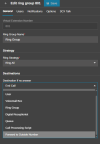
We use 3CX AI becuase it has the features we need. When deploying a new instance from the 3CX portal it deploys as Pro defualt then we add our liscence. I found that as Pro our call handling options give us the ability to forward calls to an outside number when "Destination if no answer" to a ring group. When we update the lisence to 3CX AI this option goes away so we must add a user just to forward calls from a ring group when there is no answer. This adds an additional 100+ users per instance for us.

This was no big deal until the Maximum user policy came up.

Can 3CX fix this?

 

Attachments

  • 3CX RG Destination no Answer.jpg
    3CX RG Destination no Answer.jpg
    18.8 KB · Views: 10
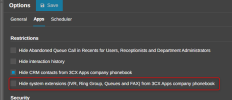
Hi @PV_Support please navigate to the pbx admin console --- system ---- options ---- 3cx app ---- validate that the option hide system extension is disabled

1782144369202.png
 
  • Like
Reactions: Evolute IT
I think you are misunderstanding the issue.

Please note that this issue is with 3CX AI Edition 8SC + and is consistant among our 50+ instance 8SC, 16SC, 32SC and 64SC

Please also note that when deploying a new instance we have the option with the 3CX Pro 8SC free liscence and lose the option when updating to 3CX AI Edition.

Since the update to V20 - over a year now - When creating a ring group we do not have the option to forward calls to an outside number when Destination if no answer.

The only option we have are:

End Call​
User​
Voicemail Box​
Ring Group​
Digital Receptionist​
Queue​
Call Processing Scripts​
The option that is missing is Forward to Outside Number.
 
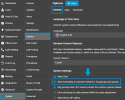
In this scenario, please navigate to Admin > System > Options.

There, under the General tab, browse down to the System Settings item. There, ensure that the option 'Allow forwarding to external numbers in ring group and queues' is enabled as in the attached image, and save the changes.

After this, perform a new test and let us know the results.
 

Attachments

  • Screenshot 2026-06-22 154551.png
    Screenshot 2026-06-22 154551.png
    85.7 KB · Views: 9
This is enabled by default and currently enabled on all systems.

Please note that this issue is with 3CX AI Edition and is consistant among our 50+ instance 8SC, 16SC, 32SC and 64SC

Please also note that when deploying a new instance we have the option with the 3CX Pro 8SC free liscence and lose the option when updating to 3CX AI Edition.
 
This is enabled by default and currently enabled on all systems.

Please note that this issue is with 3CX AI Edition and is consistant among our 50+ instance 8SC, 16SC, 32SC and 64SC

Please also note that when deploying a new instance we have the option with the 3CX Pro 8SC free liscence and lose the option when updating to 3CX AI Edition.
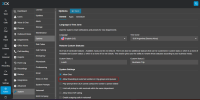
This call forwarding to an external number is independent of the key type. I have an AI license and the forwarding is there:

1782155807076.png

1782155870398.png


Please open a support ticket so we can review your configuration.

Thank you!
 
  • Like
Reactions: BrunoI_3CX
Its great that you have it. We lost this option when updating from V18 to V20 and do not have the option on any new version 20 instance.

We also use Multi Company Mode which may be the vaiable that removes the option.
 
Its great that you have it. We lost this option when updating from V18 to V20 and do not have the option on any new version 20 instance.

We also use Multi Company Mode which may be the vaiable that removes the option.
Yes, if you are using MCM that is not available. It is for dedicated deployments using any key PRO, AI it does not matter the key....
 
Why is it not availible for MCM?
 
Why is it not availible for MCM?
When using MCM it ensures strict tenant isolation, the system automatically restricts global routing options and shared system extensions. This prevents any accidental cross-talk or data visibility between different company departments.

If you really need the feature, then they must use a dedicated machine.
 
In the Ring group The option to Forward to Outside Number is availible in When office is closed route to just not in Destination if no answer. If it can do it while the office is closed, why cant it do it when the office is open.

Additionaly for ring groups that were created before the V20 update, the option to Forward to Outside Number is still availible and working for Destination if no answer.

The capability is there, and there is nothing keeping it from working as it is currently working for some ring groups

This seems more like a goof in the build.
 
Last edited:

Members Online Now

No members online now.

Forum statistics

Threads
111,832
Messages
589,285
Members
164,662
Latest member
DejanMDS