Solved call park from ATA Grandstream HT801

Status
Not open for further replies.

BABALUCHA

Silver Partner
Advanced Certified
Joined
Jan 9, 2021
Messages
217
Reaction score
42
Hello Everyone
first of all thank u so much stopping by and checking this out .i have a customer who wants to use an analog cordless phone with ATA adapter Grandstream HT801 with 3cx instance hosted by 3cx. So i have successfully installed the system and have provisioned the Grandstream ATA HT801 with the system and tired an Analog phone and it works but i cant seems to place a call on park . but what i noticed is that i can press FLASH and it puts caller on hold and if i press again than i can get connected back to caller.
 
Hi,

You have to use Parking Orbits and the ATA's built in transfer codes.
I suggest you read Grandstream's manual, it is very informative.
 
  • Like
Reactions: BABALUCHA
Hi,

You have to use Parking Orbits and the ATA's built in transfer codes.
I suggest you read Grandstream's manual, it is very informative.
Hello John
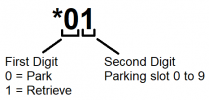
Thank u so much for quick response .i have found this on the manual and will try this at the site as i do not have lab setup here in office.But quick question so if i want to park the call in a room than on the cordless analog phone i press FLASH and than dial *00 for the first call now if i want to place a second call park in same room i use FLASH followed by *01 ...?
1654689312646.png
 
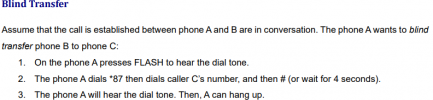
  1. Press flash so you can hear the dial tone.
  2. Dial *87 followed by a Parking Orbit *00 for example.
  3. Wait until you hear the dial tone again, and hang up.
  4. Call *10 to retrieve the call from anywhere.

1654689939592.png

PS: hook flash might not work on your specific DECT handset because the flash duration is not always the same in all countries or handset models. I think you should avoid the analog DECT handset and just get a Yealink W60 base with a nice handset to go with it. You still have the range of DECT, and it is also fully compatible with 3CX.
 
Last edited:
  • Like
Reactions: BABALUCHA
  1. Press flash so you can hear the dial tone.
  2. Dial *87 followed by a Parking Orbit *00 for example.
  3. Wait until you hear the dial tone again, and hang up.
  4. Call *10 to retrieve the call from anywhere.

View attachment 30504

PS: flash might not work on your specific handset because the flash duration is not always the same in all countries or handset models. I think you should avoid the analog flash handset and just get a Yealink W60 base with a nice handset to go with it. You still have the range of DECT, and it is also fully compatible with 3CX.
Thank you so much John. i will try this at the site today and see if customer likes it , they wanted a cheaper option so that is why i bought the ATA for them and cheap Analog phone set :)
 
I think it will work fine for about half the cost of the Yealink solution, but it will not be as refined.

I guess the customer gets what they want :p
 
  • Like
Reactions: BABALUCHA
I think it will work fine for about half the cost of the Yealink solution, but it will not be as refined.

I guess the customer gets what they want :p
Yes True .Thanks
 
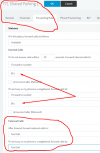
Depending on how many parking orbits are used on a regular basis. You could create a few dummy extensions , 500, 501, 502...that are forwarded to SP0, SP1, SP2, etc. Doing a flash, then dalling the extension number associated with a parking orbit, should transfer the call there. Anyone dialing the same extension, should pick up the parked call.
 
  • Like
Reactions: BABALUCHA
Depending on how many parking orbits are used on a regular basis. You could create a few dummy extensions , 500, 501, 502...that are forwarded to SP0, SP1, SP2, etc. Doing a flash, then dalling the extension number associated with a parking orbit, should transfer the call there. Anyone dialing the same extension, should pick up the parked call.
Hello leejor thanks for your time and effort .
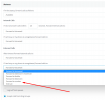
Just wondering what to put ( like digits ) so that all calls are forwarded to that parking 1 or 2 . i have succefully done that testing for following :
1 how to put HOLD and Un HOLD
2 Transfer BLIND and UN Attendant
3 how to park the call in parking orbit spot and how to retrieve it from any phone.
But i wana know if the customer can see the FLASHING button on the Fanvil X4U phones that i created for SP1 and SP2 . That will be better for me , there is only one cordless phone and they will hardly use it and even if they use it than they will hardly put the call on hold/Call park etc. but it will be nice if they can use Shared Parking 1 and everyone else on the phones sees it. i m just trying my best so that customer has good experience with less expensive solutions.. lol.

1654710913738.png
 
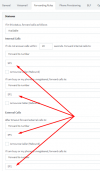
I just have it set, under Available, to forward to number SP0, for a single parking orbit. Probably just required under Internal calls as you don't want any external callers reaching this.. You will know it works if, from any extension, you dial the new extension you created, and it goes to music (on hold).
To use you do a simple transfer, normally just a flash and the extension number. Doing a blind transfer from an ATA usually requires a flash, then the blind transfer short code (*XX), as required by the particular ATA.
 
  • Like
Reactions: BABALUCHA
I just have it set, under Available, to forward to number SP0, for a single parking orbit. Probably just required under Internal calls as you don't want any external callers reaching this.. You will know it works if, from any extension, you dial the new extension you created, and it goes to music (on hold).
To use you do a simple transfer, normally just a flash and the extension number. Doing a blind transfer from an ATA usually requires a flash, then the blind transfer short code (*XX), as required by the particular ATA.
Thank you so much :)
This is what i did and works great for my clients .
1654784315975.png
 
As I said previously, If you use an IVR, where an outside caller can dial an extension, you may wish to remove the forwarding option for External Calls as you really don't want those callers to dial that number.
 
  • Like
Reactions: BABALUCHA
As I said previously, If you use an IVR, where an outside caller can dial an extension, you may wish to remove the forwarding option for External Calls as you really don't want those callers to dial that number.
Hi leejor
yes i will disable it now, you got point there.
1654784743377.png
 
Status
Not open for further replies.

Forum statistics

Threads
111,974
Messages
590,081
Members
164,899
Latest member
mazet