Hi John,Hi @deves
- What happened when you tried?
- What version is your 3CX
- What model is your Yealink Base
- What firmware is your Yealink Base using?
- What firmware is your W56H using?
Hi John,Currently we support the following versions from https://www.yealink.com/products_48.html (under the "Software" button)
W56H-61.85.0.35
W60B-77.85.0.25
When using these versions mentioned above on 18.0 Update 3 (Build 450) I was able to successfully park and unpark using TRAN + *01 + TRAN on the handset. If you were instead pressing the OK button then it will lead to an attended transfer and will cause a forbidden message - avoid doing this.
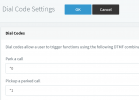
I was able to successfully unpark using *11 + OK (or View attachment 28589 )

To be sure that the configuration is not facing any problems, I would recommend to:
1. Factory Reset the W60B
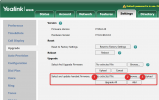
2. Install the firmware that is 3CX-tested and supported (on both devices)
3. Provision the W60B
4. Pair the W56H and try again
Additional check:
View attachment 28604
Ensure that the rest of the system dial codes do not conflict with the ones defined for parking. If there is a conflict, then no device would be able to unpark using *1x
Ah I see! Glad to hear all is good now!I just tried to connect to Yealinks back to my 3CX, and tried again to park and unpark.
Now it just worked perfect! So the downgrade of the base firmware only was enough to let it work.
John, thank you so much for your fast support!
Founded in 2005, when VoIP was an emerging technology, 3CX has gone on to establish itself as a global leader in business communications.