Solved Call park pickup using W56H

Status
Not open for further replies.

deves

Customer
Basic Certified
Joined
Mar 10, 2022
Messages
5
Reaction score
1
Hi,

Is it possible to do a call park (*01) and pickup the call (*11) using a Yealink W56H?
I can't get this to work.
 
Hi @deves

- What happened when you tried?
- What version is your 3CX
- What model is your Yealink Base
- What firmware is your Yealink Base using?
- What firmware is your W56H using?
 
Hi @deves

- What happened when you tried?
- What version is your 3CX
- What model is your Yealink Base
- What firmware is your Yealink Base using?
- What firmware is your W56H using?
Hi John,

Thank you for your response,

- What happened when you tried?
When I try to park a call on the Yealink (During call --> options --> transfer --> *01) it gives me an error 'forbidden' and the call continues.
(All users have permission to park calls)

When I try to pick up a call (parked by softphone) with calling to *11, The Yealink starts ringing, but keeps ringing. The on hold music stops on the other side.

- What version is your 3CX
Hosted by 3CX, 18.0 Update 3 (Build 450)

- What model is your Yealink Base
W60B

- What firmware is your Yealink Base using?
77.85.188.2

- What firmware is your W56H using?
61.85.188.2
 
Currently we support the following versions from https://www.yealink.com/products_48.html (under the "Software" button)

W56H-61.85.0.35
W60B-77.85.0.25


When using these versions mentioned above on 18.0 Update 3 (Build 450) I was able to successfully park and unpark using TRAN + *01 + TRAN on the handset. If you were instead pressing the OK button then it will lead to an attended transfer and will cause a forbidden message - avoid doing this.

I was able to successfully unpark using *11 + OK (or 1647001176673.png )
 
Currently we support the following versions from https://www.yealink.com/products_48.html (under the "Software" button)

W56H-61.85.0.35
W60B-77.85.0.25


When using these versions mentioned above on 18.0 Update 3 (Build 450) I was able to successfully park and unpark using TRAN + *01 + TRAN on the handset. If you were instead pressing the OK button then it will lead to an attended transfer and will cause a forbidden message - avoid doing this.

I was able to successfully unpark using *11 + OK (or View attachment 28589 )
Hi John,

Using your instructions, I was able to park a call using the W56H, thank you!

Only unpark doesn't work at this moment. When I try to call *11, the phone start 'calling' but never goes into to the call itself. Should I try downgrade to the supported firmware, or is there something else I should try?
 
To be sure that the configuration is not facing any problems, I would recommend to:

1. Factory Reset the W60B
2. Install the firmware that is 3CX-tested and supported (on both devices)
3. Provision the W60B
4. Pair the W56H and try again

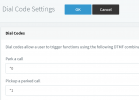
Additional check:
1647009795197.png
Ensure that the rest of the system dial codes do not conflict with the ones defined for parking. If there is a conflict, then no device would be able to unpark using *1x
 
To be sure that the configuration is not facing any problems, I would recommend to:

1. Factory Reset the W60B
2. Install the firmware that is 3CX-tested and supported (on both devices)
3. Provision the W60B
4. Pair the W56H and try again

Additional check:
View attachment 28604
Ensure that the rest of the system dial codes do not conflict with the ones defined for parking. If there is a conflict, then no device would be able to unpark using *1x

I just downgraded the W60B successfully, but I'm not able to downgrade the W56H.
I don't know if you could help me with this...

I uploaded the right W56H firmware, but the phone itself keeps saying it's already up to date.
Rebooting the phone doesn't force anything.
 
I just tried to connect to Yealinks back to my 3CX, and tried again to park and unpark.
Now it just worked perfect! So the downgrade of the base firmware only was enough to let it work.

John, thank you so much for your fast support!
 
  • Like
Reactions: JohnS_3CX
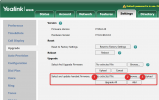
1. Put your handset on the charger

2. Try uploading the handset firmware like this
1647014524195.png

If you still have a problem, please read the Yealink manuals that will explain how to do it in more detail.
 
I just tried to connect to Yealinks back to my 3CX, and tried again to park and unpark.
Now it just worked perfect! So the downgrade of the base firmware only was enough to let it work.

John, thank you so much for your fast support!
Ah I see! Glad to hear all is good now!
 
Status
Not open for further replies.

Members Online Now

Forum statistics

Threads
111,832
Messages
589,278
Members
164,662
Latest member
DejanMDS