Call Quality Issues

Status
Not open for further replies.

kriley87

Silver Partner
Advanced Certified
Joined
Jul 24, 2019
Messages
108
Reaction score
22
Good morning-

We are running V16 on Debian and running into various call quality issues such as periods of in and out silence during calls, delayed audio, etc. If we try the *777 echo test the audio quality seems just fine but several phone calls across multiple extensions are experiencing these call quality problems.

A little bit of background: We moved from hosted FreePBX (hosted by Vultr) to a hosted 3CX solution (Running on a HyperV VM in our data center). The customer office internet circuit is fiber and a Sonicwall TZ500 firewall is in use. Before the move from FreePBX to 3CX, these call quality issues weren't happening so I don't think it would be a network and/or internet problem in the customer office.

The 3CX firewall test passes with flying colors so it seems that all of the proper ports are opened. Would anyone mind pointing me in the right direction here? Just FYI, we have another 3CX installation in this same data center for another customer and they don't have any of the problems that I've mentioned above so that rules out a bandwidth problem or a configuration issue in our data center it would seem.

Any suggestions would be appreciated.
 
Last edited:
is it always same phones having quality problems?
is it same quality problem if calls are between extensions?
Which audio codecs are used on phones?
Are the phones up to date on firmware and templates?
Do you use custom templates?
is it the preferred codec your sip trunk provider expect? is it set in first in trunk settings?
are your phones powered with POE or each has his personnal power supply?
Do you use Vlan's?
Do you use Qos?
Are your phones on same Lan as PBX?
 
is it always same phones having quality problems?
is it same quality problem if calls are between extensions?
Which audio codecs are used on phones?
Are the phones up to date on firmware and templates?
Do you use custom templates?
is it the preferred one your sip trunk provider expect? is it set in trunk settings?
are your phones powered with POE or each has his personnal power supply?
Do you use Vlan's?
Do you use Qos?
Are your phones on same Lan as PBX?

Hi! Answers below..

is it always same phones having quality problems?
No, multiple extensions have this issue. I have recordings from both voicemails and actual calls from various extensions that highlight these issues. The issues aren't isolated to one or two devices. By the way, all users are using the 3CX softphone. Not sure if that makes a difference or not.

is it same quality problem if calls are between extensions?
I'm not sure on this, let me gather some more data and I can answer this.

Which audio codecs are used on phones?
Defaults? We haven't changed anything in terms of codecs. There are only about 12-15 active extensions on this phone system as of now. The customer office has a 100mb fiber circuit as well.

Are the phones up to date on firmware and templates?
No hardphones are used -- just the 3CX Softphone.

Do you use custom templates?
No hardphones

is it the preferred one your sip trunk provider expect? is it set in trunk settings?
We only have 1 SIP provider set up: Bandwidth

are your phones powered with POE or each has his personnal power supply?
No hardphones

Do you use Vlan's?
No

Do you use Qos?
No

Are your phones on same Lan as PBX?
No, the PBX is hosted.
 
Are you using an SBC and does your VM have enough resources?

Did you follow the instructions when installing the VM where it says to install the NTP?

Are you two sites in the same data centre using the same provider?
 
@kieferschild
Are you using an SBC and does your VM have enough resources?
We are not using an SBC. The VM in question has significantly more resources assigned to it than the other 3CX install in our datacenter that isn't having these issues. The VM in question has 4 virtual processors assigned to it with 8GB of memory and these resources are barley being touched according to the 3CX dashboard.

Did you follow the instructions when installing the VM where it says to install the NTP?
I'm not sure what you're referencing here, mind sharing a link?

Are you two sites in the same data centre using the same provider?
Yes, both are using Bandwidth


Thanks for your thoughts!
 
Also if you aren't using a SBC do you have a VPN? If you are doing STUN, I would definitely recommend a SBC.
 
@cobaltit

This is what's throwing me for a loop.. we have another 3CX install with significantly more extensions, and less resources running on the same VM host as this customer and they don't have these issues.

Logic tells me it's gotta be something with the customer network, however the *777 echo test checks out, and the fact that they were running on FreePBX for 3 years without any of these problems until the cutover to 3CX just has me perplexed right now..
 
Sip trunk audio codec is not only a problem of bandwith, this is to avoid audio transcoding so PBX has to work more .
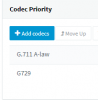
for example my sip provider use G711A first and G729, so my sip trunk settings are done like this.
12644
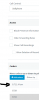
my extensions using softphones or deskphones are set in same way
12645
 
Are they using softphones on smarphones or computers? wifi , 4G ,Lan connected?

If there is no deskphones then no need of SBC, softphones are using direct tunnel 5090 port to reach PBX
 
@aws2p

All extensions are using the 3CX Windows client. However I just checked the extension settings and the option to use the 3CX tunnel for the 3CX app is unchecked. Should this be used?
 
have you checked audio codec settings? trunk and extensions?
 
have you checked audio codec settings? trunk and extensions?
@aws2p

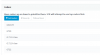
I've reached out to our carrier, Bandwidth and confirmed they are sending G711 ULaw and G729. Our trunk settings were already set up this way but the extensions were set up like this:
12646

Should we remove all of these excess codecs from this list and prioritize them the same way that our SIP trunk is set up?
 
move up G711U to first place and g729 2nd, you can let others, you need to provision to have change take effect on phones
 
@aws2p

Understood, thank you, I will give that a try. Just to make sure I understand, users would just need to close and reopen the 3CX softphone app in order for them to reprovision?
 
@aws2p

I implemented the proper codecs at the extension level from the last reply but had a report and another call recording example of this still happening. During the call example I have, there is a a point where the audio just goes dead for 2 seconds and then resumes.

Anything else I can check for here?

Thank you!
 
Still having this issue, I'm desperate this moment to solve this issue. Any help would be appreciated.
 
Can you make a trace Wireshark with all interfaces with 3CX with a problem call?

Did you try to connect the 3CX phone to another server hosted elsewhere and test if it has call problems?

That way you will be able to validate at which level the problem is found.
 
Hi @Alexndre

I will perform those testing steps you've suggested and report back.

As an added note, voicemail audio files also contain periods of audio going in and out (silence).. I'm not sure if that helps pinpoint anything? I would assume if the audio skipping is present in the voicemail files, then the issue wouldn't be customer network related since the voicemail was left on the system which is hosted and never traversed the customer network. Thoughts?
 
Last edited:
Yes, your right about the voicemail. A person who calls the phone number and leaves a message only goes through the SIP provider, the internet connection where the server is hosted and the server itself.

Here are some ideas you can try if it's easy to recreate the problem.

Set up another SIP provider to see if the problem is still there.

Configure trafficshaping in the Sonic wall firewall to ensure quality.
https://www.sonicwall.com/support/k...nfigure-bandwidth-management/170521130013462/
 
Status
Not open for further replies.