Solved Call queue is always busy with no calls

Status
Not open for further replies.

TurabG

Free User
Joined
Jun 12, 2018
Messages
58
Reaction score
1
Hi,

I had previously opened a thread for this with a different type of error:
https://www.3cx.com/community/threa...all-cause-487-request-cancelled-invite.57609/

3CX version was 15.5 back then. Now I upgraded to 16.0.493 but still can't manage to make Call Queues work.

I create a queue with my own extension being the only agent. I check the queue status both from web panel and my mobile app; I am logged into the queue.

But when I call the queue from a mobile phone, it prompts that all agents are busy and hangs up the phone.

Here is what it says in event log;

Code:
Lost Call in Queue Test (8009) from Caller ID '90xxxxxxxxxx' Queue: 8009 [Test] caller: 90xxxxxxxxxx

And in the call log it says "Not Answered" for this call.
 
Do you use a Pro license ?
Is it a windows or debian? cloud or on premise?
Did you opened a support ticket like @YiannisH_3CX suggested you ?
 
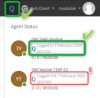
1581410457319.png

Can you confirm that the agent is logged into Queues (big Q on top) but is also explicitly logged in to that specific queue? (Small Q below)

In this example we see that EXT 060 is not explicitly logged into this Queue but EXT 000 is.
 
John, there is only one Queue setup. Big Q on the left side indicates it is logged in. My mobile client indicates it is logged in. (And when I click the big Q button, it says "are you sure to log out from the queue".)

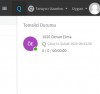
Now with the Chrome extension I am checking per your question, now it says "logged out" but how? And why? And how to login to a specific queue? More importantly, why would it log me out of the queue while I haven't logged out from anywhere.

1581414086508.png

By the way, this is an Enterprise installation on a Windows 2012 Server.
 
Thank you John. Yes I know the difference between Global Login and Explicit Logins and figured that I needed to click the small Q near the log out message. But it has no effect. Nothing happens. No color changes, no new entries on the status list, just nothing happens clicking that Q.
 
In the screenshot we see EXT 1020. You cannot click the small Q because either of the two possibilities I would imagine:

1. You are logged in to the webclient as some other extension (not 1020) so you are not allowed to click the small Q

2. You are logged in to the webclient as some extension who is not the Manager of this queue. The manager is normally allowed to explicitly log users in or out of his queue.
 
Yes 1020 is my extension and I logged in with my own credentials. I haven't assigned a queue manager to this queue but as far as I know, it is irrelevant here. Because an extension already can log in and out of a queue.
 
Have you pressed the Q to log you back in and when you log back in do you receive calls?

Have you got auto switching enabled which will log you out of queues?

Have you tried Chrome in private browsing?
 
  • Like
Reactions: JohnS_3CX
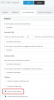
1581423047663.png

Ok then make sure that on extension 1020 you do not have this option.

Otherwise clicking the small Q will do nothing.
 
@kieferschild thank you for your time. As I already told, pressing the small Q button next to my extension has absolutely no effect. Pressing the big Q button logs in and out globally and has no effect on this specific queue. (Though there is only one queue presently, because I can't make it work already.)

@JohnS_3CX , yes before I got back to the topic, I figured from the forwarding rules. I thought it was an option for the user, to let them to be able to log out. Now it works.
 
Glad to hear it was resolved
 
Status
Not open for further replies.

Latest Posts

Forum statistics

Threads
111,935
Messages
589,823
Members
164,818
Latest member
Guriqbal Singh