Call Queue Login/Out

Status
Not open for further replies.

Vineeth Mohan

Free User
Joined
May 25, 2021
Messages
104
Reaction score
4
Hi,

I have fanvil X3SP phone on which i had configured the agent. I would like to configure in such a way that agent can login / out depending upon availability. I need reports to be generated to monitor the agent login/out time
 
Hi @medigitalgroup,

This is doable, you can have that single extension assigned to a queue you've created for them. You can run an Agent Login History report for that queue and that specific extension. You can also set up two BLF keys on the device for quick log in / log out, however this will be globally.

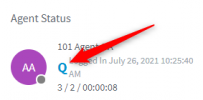
If the agent is apart of multiple queues and you'd like them to only log out of one queue, this will have to be managed via the switchboard:

1627472520066.png

If you require instructions on how to set this up, let me know.
 
@VasilisV_3CX Thanks for the reply. I would liket to get the instructions on how to setup.

Thanks in advance
 
Hi @medigitalgroup,

Let's take it step by step.
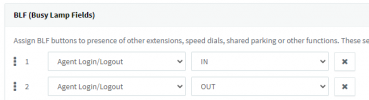
  1. In the Management Console >> Extensions >> <The extension you want to use> >> BLF >> Add the BLFs you'd like:

    1627472826384.png
  2. Now Create the Queue you'd like by clicking Management Console >> Call Queues >> Add. Within the Agents tab, add the extension as an agent. If you'd like to monitor the queue, add yourself as a Queue Manager under the Notifications section.
  3. Provision the phone by following this guide: https://www.3cx.com/sip-phones/fanvil-x3-x5/
  4. Decide the call flow of your PBX, if you want this queue to receive all calls, set it in the SIP Trunk options. If not, set it however you'd like. Test by calling the queue internally first, ensuring the phone rings and shows the BLFs. If yes, test the log out function and call again. Your call should be routed based on the Destination if no answer set in the Call Queue options.
  5. Reports: From Management Console >> Reports >> Add a new report >> Select Agent Login History. Select the correct queue and agent. This should show your log ins / log outs from the testing you did earlier.
That's it.
 
@VasilisV_3CX I tried the above. But as I told you I have fanvil X3SP phones with me. I doest have any BLF Keys. How can i configure login/out in that case?

Thanks in advance
 
Hi @medigitalgroup,

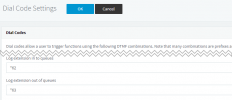
No problem, you can use the Dial Codes, note though that this will globally log the extension in to all queues / out of all queues:

1627473389411.png
 
@VasilisV_3CX Does this mean that agent will be logged in to all call queues configured in the pbx?

I tried dialling *63 from an agent logged in phone who is a member of one call queue. I heard the message agent has been logged out. In the management console i can still see the agent is memnber of the call queue?

Thanks in advance
 
Last edited:
Hi @medigitalgroup,

Yes it is a global log out. You can manually log out of individual queues from the switchboard in the Web Client as mentioned above in post #2.
 
Status
Not open for further replies.

Latest Posts

Forum statistics

Threads
111,982
Messages
590,120
Members
164,909
Latest member
Jacob.Ive