Call Transcription Confusion

NJohnson

Premier Customer
Joined
Jan 30, 2021
Messages
33
Reaction score
15
My apologies if this post has been answered before, though I couldn't find anything definite. The requirements for call transcription is really confusing and there seems to be some conflicting information floating around the forums making it more confusing. Currently, I'm running V20 U9 on a 48 SC Pro license (on-prem). Our leadership staff would like the ability to transcribe call recordings of our sales staff for quality control. It appears that the only thing I've been able to make certain is that we would need to upgrade from the Pro license to the AI license. Other than that, I'm confused. Do I have to have a stand alone 3CX AI server regardless if we're going to send it to the cloud or on-prem? If so, why does the recommended specs suggest I need a Mac Mini M4 or Mac Studio M4, when they don't have an Nvidia GPU (according to Apple specs) even though it says for the 3CX AI server an Nvida GPU is required. (https://www.3cx.com/blog/docs/cloud-vs-local-ai-server/). I'd rather process the transcriptions locally than send them off to an outside AI platform. If anyone can provide some concrete information, that would totally make my week as our leadership team is wanting this implemented soon.
 
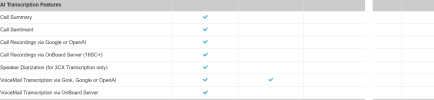
Hi @NJohnson you can find the information you need by checking the feature list on this site

1790596757774.png

To clarify how transcriptions work based on your license:
  • PRO License: Only supports voicemail transcriptions (via Grok, Google, or OpenAI).
  • AI License: Required for full call transcriptions.
When you upgrade to an AI license, you can choose from the following services for call transcriptions:
  • Grok
  • Open AI
  • Google
  • 3CX AI server on premise.
If you prefer to keep your transcriptions stored locally, the 3CX AI Server is the option that you have to use. Please follow the instruction in this link. This new deployment applies from SP10 which is currently in Alpha version.
 
Last edited:
  • Like
Reactions: KyriacosS_3CX
Hello,

Let me try to simplify as much as possible. Firstly we will only be tackling Call Transcription, no other AI features, to avoid complicating matters.

a) Yes, you need to upgrade to the AI edition.
b) You mention a preference for on prem for the transcription, no cloud, so cloud options go to the footnote*.
c) For on-prem you need a local separate machine to do the transcriptions.
d) In update 9, only Nvidia based machines can be used. But
e) With update 10 (that is now going through its testing releases) you have a choice of using either an Nvidia based machine or a Mac based system - which one depends on the transcription minutes you expect to be doing each month; the blog post you linked details the latest performance benchmarks.

* If you need time to source and setup a machine, or want to start transcriptions today and deploy a Mac once update 10 is out, you can set up a paid account with one of the AI providers and configure that, then switch to on-prem whenever you are ready, and disable/stop paying for that account.
 
Ok, so it seems the confusion is the difference between update 9 and update 10. Thank you both for helping clear that up for me!
 

Forum statistics

Threads
112,134
Messages
590,912
Members
165,144
Latest member
trinadmin