Solved Call transfer to a DND extension. Strange problem.

Status
Not open for further replies.

Flamba1000

Customer
Joined
Dec 15, 2020
Messages
7
Reaction score
1
This is the situation:

an extension X answers an external call.

the call must be transferred to another extension.

the user who is to receive the call forwarding has the status in DND.

now the problem starts:

if the user transfers the call from the web interface, 3CX does what is expected for the External call in DND Status (
Status DND -> External Calls -> If I am away forward external calls to: Forward to Extension XXX).
so it works fine.

if the user transfers the call from his yealink phone, the system says the extension is busy and the call end.
what are we wrong? is there any way to avoid this problem?


Thank you all.
 
To first confirm I understood this correctly:

You have an incoming call that goes to extension A who answers the call and then transfers the call to extension B who is on DND.

1. If extension A uses the Webclient to transfer the call, the call follows the forwarding rules of extension's DND profile status.

2. If extension A uses the yealink IP Phone, you get a busy message.

Is the above correct? If yes, how are you performing the transfer, is it an attended transfer or a blind transfer? You mention a busy message, is this an audio message the caller hears, which caller, the external caller or extension A who's trying to make the transfer?

Also, give us the info mentioned here so that we have a better understanding of your current setup:
https://www.3cx.com/community/threads/information-to-provide-when-requesting-help.67558/
 
To first confirm I understood this correctly:

You have an incoming call that goes to extension A who answers the call and then transfers the call to extension B who is on DND. YES

1. If extension A uses the Webclient to transfer the call, the call follows the forwarding rules of extension's DND profile status. YES

2. If extension A uses the yealink IP Phone, you get a busy message.YES

Is the above correct? If yes, how are you performing the transfer, is it an attended transfer or a blind transfer? I MUST ASK THIS QUESTION TO THE USER.'


You mention a busy message, is this an audio message the caller hears, which caller, the external caller or extension A who's trying to make the transfer? THE EXTERNAL CALLER

Also, give us the info mentioned here so that we have a better understanding of your current setup:
https://www.3cx.com/community/threads/information-to-provide-when-requesting-help.67558/ OK, SORRY

THANK YOU
 
ok then we have done the necessary checks.
the problem occurs with blind transfer, https://www.3cx.com/blog/voip-howto/blind-attended-transfer-yealink-t48-t46/ .


3CX Version, e.g. Enterprise Annual 16.0.8.9
Server OS, e.g. Debian 9 VM
IP Phone Yealink/T48S/66.85.0.5
Provisioning Method: Local
Trunk Provider or Gateway PATTON
Has the Firewall Checker passed: YES
Are custom Phone Templates being used: NO
 
Ok.
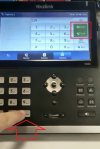
We have self-solved the problem. The user clicked on the wrong button # "Send"

he had to press the green button on the display!!!

IMG_8472.jpg
 
  • Like
Reactions: ChrisC_3CX
Glad to hear you got this resolved!
 
Status
Not open for further replies.

Forum statistics

Threads
111,974
Messages
590,081
Members
164,899
Latest member
mazet