Call/trigger URL

Status
Not open for further replies.

siqu

Forum User
Joined
Jul 8, 2020
Messages
8
Reaction score
0
You can use the 3CX Web Client or the 3CX Windows client in CTI mode, and configure that URL to be launched when your extension receives a call.
 
I can not really work with this information.
 
Just to shed some light on this:
1) You can still use your desk phones. The 3CX client can be configured in CTI mode.

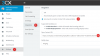
2) If you use the 3CX Web Client, you configure this from Settings > Integration > Auto launch a Custom Contact URL using variables, and you should configure the URL as follows:
https://company.crm.tld/index.php?apikey=123&msn=10&number=%CallerNumber%
1594220060819.png

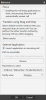
3) If you use the 3CXPhone for Windows client, you configure this from Settings > Advanced Settings > Behavior > External Application > Launch application on incoming call. Then select your browser executable, and add the URL to the "Paramters to send" field:
1594220183980.png

Hope the information helps.
 
  • Like
Reactions: siqu
I tried this yesterday and it doesn't work.
If I open this from an other PC and go to the same settings, I see the example URL but on the other PC the URL I insert yesterday.
If I call the Number, i can see the incoming Call an booth PCs. But the URL is not triggered. Obviously not really saved.
 
If I call the Number, i can see the incoming Call an booth PCs. But the URL is not triggered. Obviously not really saved.
This works for inbound calls only. Are you making outbound calls from your extensions?
 
I call the number from my mobile phone.

If I open this from an other PC and go to the same settings, I see the example URL but on the other PC the URL I insert yesterday. <-- I think, this is part of the Problem.
 
Last edited:
Can you please describe in more detail your scenario? What client are you using? The Web Client or the 3CXPhone for Windows client? How are you configuring them? Can you share a screenshot of your configuration?

Please also confirm that you're receiving an inbound call at the extension in which you're using the 3CX client.
 
I! didn't install it.
I can open in the Browser per Network internal IP (192....) the 3CX Phone System Management.
With the 3CX are a lot of Hardwarephones conected.
Calls come from outside and will be routed to the called Hardwarephone.
I want this calls documented in our CRM. Its done withe the URL from the topic. If I open it in a browser, I can see the "call" in the CRM. By just "opening" the URL.

For one number I use the Web Client. Followed your steps.
If I use an other Browser, the changes are not visible.
If I call this Number from my mobile, outside, Vodafone to Landline, I can see it in booth browsers as incoming call, but the URL is not triggered.

Because I can not see the settings in the other Browser, I think it is not saved.
May be not on the right place/Client entered.
If I log out from the browser I done the settings and Log in again, the settings are there.

If I share a picture from the settings of the 3CX Webclient, it looks like your first picture, because I have to cover the URL.

I opened It in Safari and entered one URL and than opened it in Chrome and safe an other URL. Logged out from booth and Logged in again and see in booth two different URLs, this can not be correct.
 
Last edited:
Status
Not open for further replies.

Latest Posts

Forum statistics

Threads
112,325
Messages
591,898
Members
165,477
Latest member
Mueller