I! didn't install it.
I can open in the Browser per Network internal IP (192....) the 3CX Phone System Management.
With the 3CX are a lot of Hardwarephones conected.
Calls come from outside and will be routed to the called Hardwarephone.
I want this calls documented in our CRM. Its done withe the URL from the topic. If I open it in a browser, I can see the "call" in the CRM. By just "opening" the URL.
For one number I use the Web Client. Followed your steps.
If I use an other Browser, the changes are not visible.
If I call this Number from my mobile, outside, Vodafone to Landline, I can see it in booth browsers as incoming call, but the URL is not triggered.
Because I can not see the settings in the other Browser, I think it is not saved.
May be not on the right place/Client entered.
If I log out from the browser I done the settings and Log in again, the settings are there.
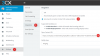
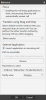
If I share a picture from the settings of the 3CX Webclient, it looks like your first picture, because I have to cover the URL.
I opened It in Safari and entered one URL and than opened it in Chrome and safe an other URL. Logged out from booth and Logged in again and see in booth two different URLs, this can not be correct.