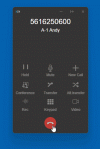
Called Number only on Desktop App

Status
Not open for further replies.

benf

Bronze Partner
Basic Certified
Joined
Sep 27, 2017
Messages
123
Reaction score
12
Hi all, we use flowroute for calling - for their IP based calling you need to prepend every call with a 6digit* , the problem is that the Windows desktop app actually displays that whole number, but doesn't seem to be an issue with the Android and physical handsets.

Here is what happens: I dial 123-456-7890 on my Desktop App the call shows and the name if it matches, a couple of seconds later the app shows this
8901920*1234567890
^^^^^^^^^ the prepended outbound config

So Im thinking in the outbound trunk there has to be something that lets me maybe change to just what I dialed , oh and also when that number flips the contact name disappears obviously. Its almost like making two calls.
 
Thanks, my Outbound CID is actually fine. This is the Dialers Number Dialed, but I will go through that, I found several people talking about changing the outbound CID to match, which I have tinkered with previously on other systems.

My issue really is when I dial XXX-XXX-XXXX *I* see yyyyyyyy*XXX-XXX-XXXX after the call delivers. I attached a 5 sec animated gif so someone can see the issue.
 

Attachments

  • CID.gif
    CID.gif
    23.3 KB · Views: 5
Yes, the linked thread is discussing exactly that. it even has a link to someone else using flowroute with ip authenticated trunks
 
Well they are talking about call history, but it may apply here, as I just noticed that too! haha .. my call history has the code in front of all my outbound calls. Ill try to figure out what this person is saying that they add and dont add the prepend ..
 
Ok I understand now, so what the user did was, instead of fixing the Caller Display issue, he simply made a rule that will compensate for the outbound dialing with the prefix in call history. That doesnt really solve either problem, because when you look at the call history every call starts with the prefix* and it doesnt match to your phone book, so unless you know everyone's number you are dialing you wont know who is who

Also this is just with the softphone client it seems. I tested a yealink and fanvil phone and the android app and none of those displayed the extra six digits in front. So there has to be a way to hide it
 
Hi @benf,

I'm afraid that this is the way that the Desktop App displays the numbers at the moment. No way to hide it that I'm aware of.
 
Status
Not open for further replies.