Caller ID and CRM Contacts

Status
Not open for further replies.

SweetAction

3CX MVP
Gold Partner
Joined
Jan 19, 2018
Messages
3,465
Reaction score
2,324
When you enable CRM integration, you can choose to create unknown contacts or not.

Typically you turn this on, so that call details (and chats, etc) are captured for new (to the CRM) callers.

The problem is that when 3CX makes the contact and the person calls back a second time, the caller ID is changed to be what's in CRM.

Imaging this workflow:
Caller #1 calls into your system. Their caller ID is set to "Business #1" and your SIP provider does a CNAM lookup. You see on your phone: "Business #1 111-222-3333" You complete the call. A new contact is made in your CRM, with the default "New 3CX Caller"
Caller #1 calls back into your system. Their caller ID is set to "Business #1" and your SIP provider does a CNAM lookup. You see on your phone: "New 3CX Caller 111-222-3333" because it's in your CRM.

While the correct answer is the agent should fix the name in CRM, this doesn't always happen and it breaks CallerID lookups.

Is there any way to resolve this? Ideally 3CX would save a new contact into CRM with the CNAM values instead of the default you set. Alternatively 3CX would always display the name from the CRM EXCEPT when that name matches the default new contact name.
 
You would need to play around a lot in the template to make this work. You cannot return contact info without a name, for starters.

Definitely if 3CX could use the SIP Display Name as new contact name, it would be nice.

Obviously, the easy answer is: yes, agents should just fix the name as soon as the contact is created by the system.
 
  • Like
Reactions: SweetAction
In 3CX v18 Update 8 we're changing the way in which contacts are created. We will not create contacts automatically anymore. Instead, the agent that receives the call in the Web Client / Desktop App will be able to click "Add contact" when there is no match, fill the contact details (first name, last name, etc.) and then create it in the CRM upon request. You will not have these "New 3CX Contact" anymore, so the contacts in your CRM will have the correct name, and your Caller ID will be OK.
 
Thanks all. Looks like today there's no official way to handle this, but coming soon there might be a good middle ground.
 
In 3CX v18 Update 8 we're changing the way in which contacts are created. We will not create contacts automatically anymore. Instead, the agent that receives the call in the Web Client / Desktop App will be able to click "Add contact" when there is no match, fill the contact details (first name, last name, etc.) and then create it in the CRM upon request. You will not have these "New 3CX Contact" anymore, so the contacts in your CRM will have the correct name, and your Caller ID will be OK.
yeeee "CreateContactFromClient" finally :)
 
  • Like
Reactions: edossantos
yeeee "CreateContactFromClient" finally :)
We're also adding support for a new scenario with ID SearchContacts, which will let you search contacts in the CRM from the 3CX clients. This scenario will receive the [SearchText] variable, which you can use to query your CRM in the fields you need. The scenario needs to return the same data as the contact lookup. :)
 
  • Like
Reactions: Evolute IT
We're also adding support for a new scenario with ID SearchContacts, which will let you search contacts in the CRM from the 3CX clients. This scenario will receive the [SearchText] variable, which you can use to query your CRM in the fields you need. The scenario needs to return the same data as the contact lookup. :)
That's amazing! Any chance we can finally get the DID in the template variables for report call? :)
 
  • Like
Reactions: edossantos and jed
That's amazing! Any chance we can finally get the DID in the template variables for report call? :)
I'm afraid this is not being included at the time being.....
 
  • Like
Reactions: Evolute IT
We're also adding support for a new scenario with ID SearchContacts, which will let you search contacts in the CRM from the 3CX clients. This scenario will receive the [SearchText] variable, which you can use to query your CRM in the fields you need. The scenario needs to return the same data as the contact lookup. :)
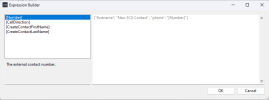
Can't you just add a variable in the template to get the caller id? We only have access to [Number] and [CallDirection], it would be way more simple to just push the caller id automatically to the CRM through the template so we don't have to edit the information Manually one by one. I have a lot of New 3CX contacts in the CRM and don't know which is each one.
 

Attachments

  • Screenshot (24).png
    Screenshot (24).png
    12 KB · Views: 20
Status
Not open for further replies.

Forum statistics

Threads
112,322
Messages
591,889
Members
165,470
Latest member
Robert Lee