Caller ID passthrough stopped working after v20 upgrade

Adam_Dudzik

Customer
Joined
Feb 10, 2021
Messages
3
Reaction score
0
Hi,

I have an issue with call forwarding to mobile phones when a call is not answered on a user’s extension. The call forwarding itself works, but before upgrading to 3CX v20 the mobile phone displayed the original external caller’s number. After the upgrade, the mobile phone now shows the user’s own number (the extension’s DID) instead of the caller’s number.

I have already compared the old configuration (v18) file with the new one, and they are identical, so the issue seems to be related to changes in v20. I have also gone through forum threads and existing advice, but none of the suggested solutions worked in my case.

Could you please advise what I can do to resolve this issue?

Best regards,
 
Hello Adam,

Which SIP trunk provider are you using? Also is the call coming in and going back out from the same trunk? Can you export your providers configuration and paste it here? Hide any sensitive info.
Also you could set the logging level to verbose and check the Activity log to see what the PBX is sending out . Check if the PBX is sending out the correct caller ID.
 
  • Like
Reactions: Evolute IT
Hi,

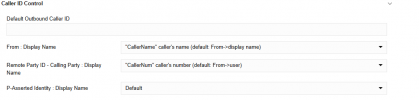
This is a generic SIP trunk. Both calls are routed through the same trunk, as there is only one configured. Please find the trunk configuration attached for reference. I have already updated the trunk settings as shown in the attached screenshot, but it had no positive effect.
 

Attachments

Hi Adam,

Looking at your template there is no OriginatorCallerID configured anywhere so by default this will not work. If this was the same configuration as V18 then it would not work there either since the configuration to support sending the Originators caller ID is not present.
You will need to export the template, switch the correct SIP header (dependent on your provider) to "OriginatorCallerId" and import the template back into the system through Advanced-->Templates --> Provider Templates --> Import provider.

Make sure you delete the original trunk before doing so.
 
  • Like
Reactions: paulodagraca
Hi YiannisH.
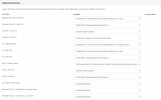
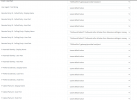
Thank you for your reply. I understand your explanation, however to double-check this I restored an old machine from backup and extracted the configuration where the functionality worked correctly. I compared it with the configuration on the current machine, and they are identical, which is why I am puzzled that it no longer works.


I have attached the configuration file and screenshots for your review. Could you please advise me on the best way forward? Perhaps the issue lies elsewhere.


Best regards,
Adam
 

Attachments

  • 2025_09_24_12_49_36_ms_3cx_v18_VMware_Remote_Console.png
    2025_09_24_12_49_36_ms_3cx_v18_VMware_Remote_Console.png
    21.7 KB · Views: 7
  • 2025_09_24_12_50_11_ms_3cx_v18_VMware_Remote_Console.png
    2025_09_24_12_50_11_ms_3cx_v18_VMware_Remote_Console.png
    66.3 KB · Views: 7
  • 2025_09_24_12_50_56_ms_3cx_v18_VMware_Remote_Console.png
    2025_09_24_12_50_56_ms_3cx_v18_VMware_Remote_Console.png
    72.5 KB · Views: 7
  • provider.pv.xml
    provider.pv.xml
    3.4 KB · Views: 2
Based on the configuration you have attached the scenario you are describing should not work in V18 either. The PBX either V18 or V20 needs the proper configuration to forward the originators caller ID back out and your trunk does not have it.
So either your call flow was different in V18 or something else is different.

You will need to export the template, switch the correct SIP header (dependent on your provider) to "OriginatorCallerId" and import the template back into the system through Advanced-->Templates --> Provider Templates --> Import provider.

Make sure you delete the original trunk before doing so.
This is the way to move forward. You need to adjust your template to use the originators caller ID in forwarding scenarios.
 

Forum statistics

Threads
111,955
Messages
589,926
Members
164,855
Latest member
parik24pro