Caller Image

Status
Not open for further replies.

KwibusMaximus

Joined
Mar 1, 2011
Messages
1
Reaction score
0
Hi, I ma happy tester of this amazing software.

I have seached this forum but could not find it, maybe someone knows.
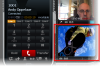
I am looking for a way to replace the image that is broadcasted on the videochannel when no camera is attached.
The caller image if you will. See attachment to see what I mean. It can not be configured via the portal.

Who knows where this image can be changed?

Kwibus
The Netherlands
 

Attachments

  • 3.png
    3.png
    134.7 KB · Views: 1,570
It appears to be

C:\Program Files\3CXPhone\vidlogo.bmp
 
Hi Kwibus

Is exactly as Frinklabs said - the vidlogo.bmp in 3CXphone's install folder.

Some additional info:
- "vidlogo.bmp" is only a generic name for 3CXPhone; you may use as logo any standard .bmp, .jpg or .gif file, but rename them as vidlogo.bmp.

- also, even the default vidlogo.bmp is set to 176x144 pixels, you may use any resolution you want, 3CXPhone will resize it, internally, to 176x144. Therefore, to avoid distortion, I suggest you to use an image having a closer aspect ratio, such as 352x288, 704x576 and so on. However, if you use a large image, such as 3000x2000 pixels, expect 3CXphone's startup to be slower, due to its internal image loading and resizing.

Be careful, the vidlogo.bmp is part of 3CXPhone's package, not user's data, therefore, when you will perform a phone update or reinstall, YOUR vidlogo.bmp will be overwritten.

Also as an additional info, by doubleclicking any of video monitor windows they will toggle to fullscreen mode.

Hope it helps
vali
 
Status
Not open for further replies.

Latest Posts

Forum statistics

Threads
112,019
Messages
590,317
Members
164,964
Latest member
Tomski