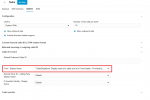
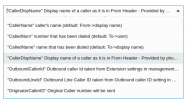
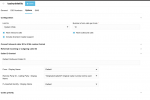
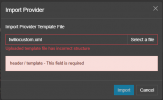
You can try this template, remember only pro and ent licenses can import templates
<?xml version="1.0"?>
<doc xmlns:tcx="
http://www.3cx.com">
<header>
<type>gateway-template</type>
<version>150001</version>
<time>2025-02-14 09:30:00</time>
<name>Twilio (Auto-setup)</name>
<url>
https://www.3cx.com/docs/sip-trunk/twilio/</url>
<image>default-icon.png</image>
<logo>default-logo.png</logo>
<description>AR,AT,AU,BE,BG,BR,CA,CH,CL,CN,CY,CZ,DE,DK,ES,FR,GR,HK,HR,HU,IE,IL,IN,IS,IT,JP,LT,LV,MT,MX,MY,NL,NO,NZ,PE,PL,PT,RO,RU,SE,SG,SI,SK,TH,TR,UA,UK,US,VN,Worldwide,ZA</description>
<priority>2</priority>
<tags>e164,registrar,port</tags>
<templatetype>preferred</templatetype>
</header>
<data>
<sms>
<variable name="MESSAGING_SID">
<title>ACCOUNT_SID</title>
<option name="Messaging Account SID" required="true" maxlength="60" type="textbox"></option>
</variable>
<variable name="MESSAGING_TOKEN">
<title>AUTH_TOKEN</title>
<option name="Auth token" secure="true" required="true" maxlength="100" type="password"></option>
</variable>
<field name="MessagingUrl" status="readonly">
https://api.twilio.com/2010-04-01/Accounts/{MESSAGING_SID}/Messages.json</field>
<field name="ProviderName" status="readonly">Twilio</field>
<field name="OptionalProvider" status="readonly">1</field>
<field name="ProviderType" status="readonly">twilio</field>
<field name="OutboundRouting" status="readonly">1</field>
<field name="HasWebhook" status="readonly">1</field>
</sms>
<device>
<type>provider</type>
<manufacturer>Twilio (Auto-setup)</manufacturer>
<model>Provider</model>
<!-- Friendly Name -->
<field name="Name">Twilio (Auto-setup)</field>
<!-- Hostnames and Port Numbers -->
<field name="RegistrarHost">[TERMINATION SIP URI].pstn.twilio.com</field> <!-- Registrar & Proxy IP / FQDN -->
<field name="RegistrarPort">5060</field> <!-- Registrar & Proxy Port Number -->
<field name="ProxyHost"></field> <!-- Proxy IP / FQDN -->
<field name="ProxyPort">5060</field> <!-- Proxy Port Number -->
<field name="StunServerHost"></field> <!-- StunServer IP / FQDN -->
<field name="StunServerPort"></field> <!-- StunServer Port Number -->
<!-- Registration Settings -->
<field name="LineAuthenticationPassword" status="readonly"></field>
<field name="TimeBetweenRegistration">600</field> <!-- Registration Expiry -->
<field name="RequireAuthFor">1</field> <!-- No=1; In=2; Out=3; Both=4 -->
<field name="IpInContactReg">1</field> <!-- Ext=1; Int=2; Both=3; Specified=4 -->
<field name="IpInContactRegValue"></field> <!-- List of PBX IPs -->
<field name="3wayauthenticationid" status="readonly"></field> <!-- Entry to enable 3 way authentication-->
<!-- Provider Capabilities -->
<field name="IsSupportReinvite">0</field> <!-- Yes=1; No=0 -->
<field name="IsSupportReplaces">0</field> <!-- Yes=1; No=0 -->
<field name="DisableVideo">1</field> <!-- Yes=1; No=0 -->
<!-- Location of Destination Number -->
<field name="DestNumberIn_TO">1</field> <!-- Yes=1; No=0 -->
<field name="DestNumberIn_REQLINEURI">1</field> <!-- Yes=1; No=0 -->
<field name="DestNumberIn_RPID_CALLED">0</field> <!-- Yes=1; No=0 -->
<!-- Other Options -->
<field name="IPRestriction">ANY</field> <!-- Restricts IPv4 or IPv6. Values: ANY, IPV4, IPV6 -->
<field name="TransportRestriction">UDP</field> <!-- Restricts the Transport Protocol. Values: ANY, UDP, TCP, TLS -->
<field name="SecondaryRegistrar"></field> <!-- Possible values: FQDN

ort or IP
ort -->
<field name="IsBindToMS">1</field> <!-- Bound=1; NotBound=0 -->
<field name="UseIPInContact">0</field> <!-- UseIP=1; DoNotUseIP=0 -->
<field name="CallerIDIn">1</field> <!-- Fm=1; To=2; ReqURI=3; Con=4; RemPtyClg=6 -->
<field name="CalledNumberIn">2</field> <!-- Fm=1; To=2; ReqURI=3; Con=4; RemPtyCld=5 -->
<codecs>
<codec rfcname="pcmu"/>
</codecs>
<!--Source Identification - Use Default PBX Internal Source Identification-->
<!--<field name="MatchStrategy">1</field>-->
<field status="readonly" name="MatchStrategy">1</field>
<field status="readonly" name="Source" parameter="FromHostPart" custom="">$GWHostPort</field>
<!-- Gateway / Provider Inbound Parameters -->
<field name="ParameterIn" custom="" parameter="ToUserPart">$CalledNum</field>
<field name="ParameterIn" custom="" parameter="FromUserPart">$CallerName</field>
<field name="ParameterIn" custom="" parameter="FromUserPart">$CallerNum</field>
<!-- Gateway / Provider Outbound Parameters -->
<field name="ParameterOut" custom="" parameter="RequestLineURIUser">$CalledNum</field>
<field name="ParameterOut" custom="" parameter="RequestLineURIHost">$GWHostPort</field>
<field name="ParameterOut" custom="" parameter="ContactUser">$AuthID</field>
<field name="ParameterOut" custom="" parameter="ContactHost">$ContactURI</field>
<field name="ParameterOut" custom="" parameter="ToUserPart">$CalledNum</field>
<field name="ParameterOut" custom="" parameter="ToHostPart">$GWHostPort</field>
<field name="ParameterOut" custom="" parameter="FromDisplayName">$CustomField</field>
<field name="ParameterOut" custom="" parameter="FromUserPart">$OutboundCallerId</field>
<field name="ParameterOut" custom="" parameter="FromHostPart">$GWHostPort</field>
<field name="ParameterOut" custom="" parameter="RemotePartyIDCallingPartyUserPart">$OutboundCallerId</field>
<field name="ParameterOut" custom="" parameter="RemotePartyIDCallingPartyHostPart">$GWHostPort</field>
<field name="ParameterOut" custom="" parameter="P-AssertedIdentityUserPart">$OutboundCallerId</field>
<field name="ParameterOut" custom="" parameter="P-AssertedIdentityHostPart">$GWHostPort</field>
</device>
</data>
</doc>