Caller's Name not displayed for incoming call on Android 3CX Mobile App

Status
Not open for further replies.

Kwang Mien

Silver Partner
Advanced Certified
Joined
May 14, 2020
Messages
255
Reaction score
17
Hi,

I have a list of contacts in my Samsung J2 Android phonebook.

When there is an incoming call to my 3CX Mobile App, the caller's name is not displayed although the caller
is one of my contacts in my Android native phonebook.

This issue did not happen for iPhone. When the contact is in iPhone native phonebook, the name of the
caller's name will be displayed on 3CX Mobile App.

Please advise if there will be any enhancement for 3CX Mobile App on Android phone to display caller's
name in the above scenario.

Thanks.

Regards,
Kwang Mien
 
Hello,

When the call comes it, it arrives on the PBX not the app.

The PBX then sends it to the app with a Caller ID via PUSH.

The client should show the name as saved in the Android phonebook.

What you can check now is:

- Does the app have rights to see your Android contacts?
- How does that ID (can be seen in 3CX system logs) compare to the number your have saved in the phonebook? Do they match?
 
  • Like
Reactions: leejor
Hello,

When the call comes it, it arrives on the PBX not the app.

The PBX then sends it to the app with a Caller ID via PUSH.

The client should show the name as saved in the Android phonebook.

What you can check now is:

- Does the app have rights to see your Android contacts?
- How does that ID (can be seen in 3CX system logs) compare to the number your have saved in the phonebook? Do they match?
Hi,

Thanks for the reply.

a. How do I check if my app has the rights to see my Android native phonebook contacts ?

b. The caller ID matches the number in my native phonebook. But it is not showing the caller's name.
 
Hi,

Tap on Contacts in our app, then on the top right you can select "All, 3CX or Android". Pick Android and see if it shows your phone contacts. If not, then you need to dig through your phone and find out how to see the app permissions (this varies across different models).

Usually, most Android phones allow you to see the App Info if you tap on an app icon and hold it down. Once you are in the App Info, you should see Permissions somewhere and from there you can choose to allow or deny Contacts.

The app asks you the first time you install it, so if you have trouble finding it, then reinstall the app and it will ask you on the first launch.

So finally if the app has the permission to read your phonebook, and you receive a call where the number the PBX saw matches perfectly with the number your Android phonebook has, you should get a match
 
Hi,

Tap on Contacts in our app, then on the top right you can select "All, 3CX or Android". Pick Android and see if it shows your phone contacts. If not, then you need to dig through your phone and find out how to see the app permissions (this varies across different models).

Usually, most Android phones allow you to see the App Info if you tap on an app icon and hold it down. Once you are in the App Info, you should see Permissions somewhere and from there you can choose to allow or deny Contacts.

The app asks you the first time you install it, so if you have trouble finding it, then reinstall the app and it will ask you on the first launch.

So finally if the app has the permission to read your phonebook, and you receive a call where the number the PBX saw matches perfectly with the number your Android phonebook has, you should get a match
Hi,

My native phone contact is in the 3CX phone contacts. But incoming call is not showing the caller's Name.

you mentioned about "The number the PBX saw...". Can I know how i can check what is the number that 3CX sees ?

Regards,
Kwang Mien
 
That's the number you see on your mobile screen, that's what the PBX sends to your Android and should match exactly what is in your phonebook.

Make sure the phone is locked before you call it, so you can see what number appears in the PUSH that is sent to the phone in order to wake up and ring.
 
That's the number you see on your mobile screen, that's what the PBX sends to your Android and should match exactly what is in your phonebook.

Make sure the phone is locked before you call it, so you can see what number appears in the PUSH that is sent to the phone in order to wake up and ring.
Hi,

On my Android screen, when there is an incoming call, i saw the below number

96344059:31000715
96344059

31000715 is the number called. 96344059 is the caller's number

In my Android native phonebook, i have a contact chankm whose number is 96344059

Rightfully, the app should be showing chankm:31000715. Is that right ?
 
Nope, not exactly. There are a couple of things that can affect this.

For example, some providers may send you a number in the invite but they may also send you a name
1592907569831.png

Sometimes what they might do is send a CallerName that contains the number of the caller as text.

In that case, the client will show you the number on the screen as 96344059 but it is not actually a number, its text and hence it cannot match.
 
Nope, not exactly. There are a couple of things that can affect this.

For example, some providers may send you a number in the invite but they may also send you a name
View attachment 16639

Sometimes what they might do is send a CallerName that contains the number of the caller as text.

In that case, the client will show you the number on the screen as 96344059 but it is not actually a number, its text and hence it cannot match.
Hi,

I compared the caller ID sent to my Android phone and the caller ID sent to my iPhone.

for android phone, the caller ID appears as 96344059:31000715. for iPhone, it is just 96344059

There is no issue displaying the caller's Name for iPhone.

How can i configure 3CX to just send 96344059 to my Android phone ?

i suspect because of 96344059:31000715, it cannot match the contact in my Android native phonebook. Hence does not display the Caller's Name.
 
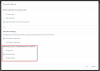
In the management console under contacts, Options: how is yours set up?
And is it coming directly or via RG / Queue?

1592914944781.png
 
In the management console under contacts, Options: how is yours set up?
And is it coming directly or via RG / Queue?

View attachment 16640
Hi,

The call is to a DID directly to my extension. In the Options, under "Add Group, Queue or DID/DDI Names to CallerID" it is set to "Append Name".

When I set to "Do not add", the Caller's Name appeared on my Android Phone. This resolved the Caller's Name issue on my Android Phone.

However, when i call to a Call Queue, the call queue name did not appear on the call agent's mobile app.

Is there a way to have the Call Queue name append in the Caller ID and at the same time fix the caller's Name issue on Android phone ?
 
Unfortunately no, this is a general setting that affects the whole PBX.
 
Unfortunately no, this is a general setting that affects the whole PBX.
Hi,

Ok. noted. One more question. I notice 3CX App on iPhone does not have the Caller's Name issue. Although it receives the caller ID as 96344059:31000715, it can match to the contact in the iPhone native phonebook.

Will there be any enhancement to 3CX App on Android phones to behave similar to the app in iPhone ?
 
Not exactly, because Apple uses CallKit API and there is no direct equivalent on Android.
 
Not exactly, because Apple uses CallKit API and there is no direct equivalent on Android.

Hi,

I did some changes to my 3CX configuration.
I removed 3100 0715 from Inbound Rule and enable the "Append Name" in the Contacts -> Options

The Caller's Name appeared on my Android Phone for incoming calls. However, there are some issues.

a. When the 3CX mobile app is in the foreground, the caller's Name always appear for incoming call.

b. However, when the phone is in standby mode or the 3CX mobile app is in the background, sometimes the caller's Name will appear, sometimes, it appeared as the caller's number. It is intermittent.

This looks like some PUSH notification issues. Can you advise ?

Thanks.
 
I think you are referring to having an unlocked phone (with the app running in the background).
In that case, Android will show you the small notification and will only contain the number. When you answer, the app loads and the name appears

In the case the phone is locked, we can display our own answering screen with the name and number while its ringing, so you know who is calling before you answer.

Can you confirm?
 
I think you are referring to having an unlocked phone (with the app running in the background).
In that case, Android will show you the small notification and will only contain the number. When you answer, the app loads and the name appears

In the case the phone is locked, we can display our own answering screen with the name and number while its ringing, so you know who is calling before you answer.

Can you confirm?

Here is what i found whether the phone is in unlocked or locked state.

When i keep calling my android phone, the caller's Name appeared. However, when i stop calling and after more than 10 secs, I call again, the caller's number appeared instead. Then subsequently if i call again immediately, the Caller's Name appeared again.

It seems that the 3CX Mobile App cannot match the native phone book contact after it become "dormant" for sometime.

Are you able to reproduce the above issue at your side ?
 
Thanks I was eventually able to reproduce this (although not consistently).

It seems to be a delay with the device contacts lookup, because if I let it keep ringing eventually it resolves the name from the contacts after a few 2-3 seconds.
 
Thanks I was eventually able to reproduce this (although not consistently).

It seems to be a delay with the device contacts lookup, because if I let it keep ringing eventually it resolves the name from the contacts after a few 2-3 seconds.
for my case, if i leave my phone in locked state for a long time and call it , it will first show the caller's number. immediately after the 1st call, for the 2nd call, will show the caller's name. it is also seems to show that there is some delay for the contact lookup for the 1st call.
 
Status
Not open for further replies.

Forum statistics

Threads
112,149
Messages
590,966
Members
165,171
Latest member
Mahlon