Calls drop, inbound and outbound.

Status
Not open for further replies.

AdrianM

Trainee Partner
Basic Certified
Joined
Nov 17, 2021
Messages
10
Reaction score
0
Hello

I have my 3CX working with some SIP Trunks with register mode. My problem is with one SIP Trunk based IP. I can not have inbound or outbound traffic.
It is an Enterprise 18.0.237 version.

This is the error I can see in logs: Cause: 408 Request Timeout/INVITE from local

Appreciate your help.
 
Hi @AdrianM,

When you make the call does it "ring" for 32 seconds and then hang up? If yes, it could mean that in combination with the 408 Request Timeout, that your provider isn't responding to your invite. Can you double check your "Registrar/Server/Gateway Hostname or IP" and make sure that the IP is correct?

If it is correct, it could also be a firewall issue as well, it may be that you're blocking the invite to your provider, or perhaps the invite is making to them but you're blocking the response from them?

If you don't believe any of the above is happening, I'd suggest contacting your provider to ensure that they are receiving the request from you.
 
Hi @VasilisV_3CX thanks for your answer.

No, it does not ring at all. I am sure that the host IP is good because it was working in another PBX system.
Also, my 3CX passed well the firewall test and I have some SIP trunk with username and password working good.

If I change this trunk to another PBX with Asterisk, it works. I think maybe is an issue with the Invite that is in the 3CX.
 
No, they are not listed in providers.
 
Well, I read completely the document, I have the inbound parameters as should be according to the INVITE I receive from my provider but still is not working.

If you can help me with something more, I really appreciate it.
 
Well, I read completely the document, I have the inbound parameters as should be according to the INVITE I receive from my provider but still is not working.

If you can help me with something more, I really appreciate it.

Check your DMTF settings. we had this cause issue originally with our (Unsupported) provider and was able to fix by abjusting this.

for inbound, check if you need a "call source identification" we needed this for our provider.

My other suggestion is take a packet capture and go through the call flow packet by packet, this is how I originally identified the issue.
 
Well step one is does the firewall checker pass. Step two is since you said this was working with another PBX, do you mean another PBX you replaced or? Because it's IP based you will have to update your provider with the IP address of your PBX so they can accept calls from it.
 
Check your DMTF settings. we had this cause issue originally with our (Unsupported) provider and was able to fix by abjusting this.

for inbound, check if you need a "call source identification" we needed this for our provider.

My other suggestion is take a packet capture and go through the call flow packet by packet, this is how I originally identified the issue.
I tested with a lot of "call source identification" parameters but it doesn't work yet.

Also, I made captures to see the call flow, and it is supposed to be in accordance with what the provider sends.
 
Well step one is does the firewall checker pass. Step two is since you said this was working with another PBX, do you mean another PBX you replaced or? Because it's IP based you will have to update your provider with the IP address of your PBX so they can accept calls from it.
Yes, the firewall checker is ok.

I had an Asterisk server and this SIP trunk was working good there. I already talked to my provider and they checked at their side.

If I step back and connect the line to this Asterisk, it works. But when I switch to 3CX, it doesn't work anymore.
 
Hi @AdrianM

If you were only having issues with outbound then I would recommend having a look at your trunk parameters but since its both ways then it looks like a more general issue.
Try an inbound call to the PBX and see if that call is reaching the system. You can verify this by running a packet capture from the PBX or by using the Activity log.
If the call is reaching the PBX then we can talk about call source identification and how to fix outbound calls. If not then it looks like a more general issue with the provider. Perhaps your call is going out a different public IP that the one the provider knows and similarly calls are sent to a wrong public IP and never hit the PBX.
 
Hi @YiannisH_3CX

I have this issue in both, inbound and outbound calls. With a packet capture, I can see the call reaches the PBX.
I set up the IP that the provider gave in the options tab but it doesn't work.
I think maybe it is a source identification problem, but I am not sure which to set up. Already tried a lot of options in that tab, but the same result.

Can you help me please?
 
Since you see it hitting the PBX in the capture, was does the PBX reply ?
 
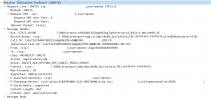
I can see the incoming call in the capture, but I don't see anything in the logs.

The call is reaching but I think the PBX is not responding.

1637593660829.png
 
Please bear in mind that packet captures occur in the NIC level of the machine. So even if the call is hitting the NIC it might not be reaching the PBX. If it is you will see if in the Activity log. Set the logging level to Verbose and check there.

Could something in between be interfering with calls like an antivirus software or windows firewall or IP Tables for Debian?
 
This PBX is on Debian, so there is no antivirus and if I am right, there isn't firewalld or iptables on this system.

When I try to check iptables or nft status, it says that the service could not be found.
 
I set the logging level to verbose, but the same, the call didn't reach the PBX.
If I set up this provider in an Asterisk system, the call works fine. So, I don't think is a provider problem, it has to be something in the parameters of 3CX (inbound and outbound trunk parameters)
 
If you cannot see the call hitting the system then nothing you can configure will make a difference. Also since this is not a supported provider then we don't really know what needs adjusting since each provider uses different settings.
The generic template uses the most common settings but those may not apply to your provider.
 
Status
Not open for further replies.

Forum statistics

Threads
111,994
Messages
590,183
Members
164,934
Latest member
bunthoeun.may