Calls not coming in correctly

Status
Not open for further replies.

Sam71

Joined
Oct 21, 2008
Messages
49
Reaction score
0
Hi all,

Having an issue where calls are not coming in through a ring group via spa 3102 or voip!
- Works after a reboot for a short time!

Running V12 on Hyper V

There are two ring groups.... Office hours and after hours - to a voicemail if no answer!

The extensions appear to ring and then it goes to a default voicemail and not the one that is set!

Log File is attached:

cheers
Scott
 

Attachments

In this scenario, which extension's voicemail, is the call supposed to be going to?

It rings the sets in the ring group, then seems to go off to extensions, 103, 104 and 101,(after attempting to go to voicemail) all of which fail, then finally going (again) to voicemail.

You might want to post screen shots of the ring group settings.
 
It goes to 101 voicemail!
 
And does Ext 101 have anything, in the way of options, that would cause the call to go to the other extensions?
 
leejor said:
And does Ext 101 have anything, in the way of options, that would cause the call to go to the other extensions?

Not sure what you mean?
 
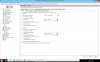
You mean possibly here?
 

Attachments

  • Ext 101 forward rule.jpg
    Ext 101 forward rule.jpg
    225.2 KB · Views: 3,117
Is the ring group set to go to an extension, or the voicemail of an extension?
 
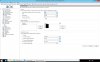
This is for office hours, out of hours is the opposite i.e. 105 is the only active ext.
 

Attachments

  • 3cx Ring Group 800.jpg
    3cx Ring Group 800.jpg
    202.9 KB · Views: 3,089
Everything looks pretty straight forward going by your screen shots. Of course there are a lot of tabs for the extension that aren't shown. if you haven't changed anything in them, that might be affecting the calls, then I'm not sure what is going on.
Set the 3CX log to Verbose and see if there is any additional information as to why the call is not reaching extension 101's voicemail right after the initial ring group.

Did this problem begin after some changes were made to the PBX?
 
Hi,
from what i can see in the first screenshot in the Forwarding rules in the Available tab you have specified the call after 20 seconds to go to Extension 101(yourself since you are already to extension 101) if no answer or if busy. As you can understand you have a loop on your configuration.

The most common reason for the call after 12 seconds (Specified in Ring Group) not going to the Voice mail is that none of the extensions on the Ring Group answers the call (ring all ) and user 101 is busy so the call goes back to extension 101 since you have not specified the option "be able to accept more than one calls at the same time" and the call stays active in your network (loop) and does not follow the "Destination if no answer" that is set to the Ring Group and go to the Voicemail of Extension 101.
The call probably is terminated be the caller.
Make the configuration changes and try again.
 
Thanks for that!

I had noticed that but didn't change it.... Will do for all extensions and point to 101 VM!

What should the "If the call is not answered within" time be? or do I leave it as 20, match the 12 of the ring group or something else?
 
Also getting this for ext 101 a few times a day!
 

Attachments

It appears that possibly when ext. 101 is busy the calls are getting lost for some reason!
It rings however you get the default VM message, not sure where it would go as all ext's go to vm 101

19-Jun-2014 15:27:32.368 Leg L:28.5[VMail] is terminated: Cause: BYE from PBX
19-Jun-2014 15:27:32.368 [CM503008]: Call(C:28): Call is terminated
19-Jun-2014 15:27:32.367 Leg L:28.1[Line:10002<<10002] is terminated: Cause: BYE from 192.168.115.60:5062
19-Jun-2014 15:27:22.782 [CM503007]: Call(C:28): VMail:999 has joined, contact <sip:[email protected]:40600>
19-Jun-2014 15:27:22.781 [CM503007]: Call(C:28): Line:10002<<10002 has joined, contact <sip:[email protected]:5062>
19-Jun-2014 15:27:22.781 L:28.5[VMail] has joined to L:28.1[Line:10002<<10002]
19-Jun-2014 15:27:22.781 NAT/ALG check:L:28.5[VMail] RESPONSE 200 on 'INVITE' - basic check passed. No information for extended checks
19-Jun-2014 15:27:22.702 Leg L:28.3[Extn] is terminated: Cause: 487 Request Terminated/INVITE from 192.168.115.62:5060
19-Jun-2014 15:27:22.702 [CM503003]: Call(C:28): Call to <sip:[email protected]:5060> has failed; Cause: 487 Request Terminated/INVITE from 192.168.115.62:5060
19-Jun-2014 15:27:22.691 Leg L:28.2[Extn] is terminated: Cause: 487 Request Terminated/INVITE from 192.168.115.63:5060
19-Jun-2014 15:27:22.690 [CM503003]: Call(C:28): Call to <sip:[email protected]:5060> has failed; Cause: 487 Request Terminated/INVITE from 192.168.115.63:5060
19-Jun-2014 15:27:22.686 Leg L:28.4[Extn] is terminated: Cause: 487 Request Terminated/INVITE from 192.168.115.64:5060
19-Jun-2014 15:27:22.685 [CM503003]: Call(C:28): Call to <sip:[email protected]:5060> has failed; Cause: 487 Request Terminated/INVITE from 192.168.115.64:5060
19-Jun-2014 15:27:22.638 [CM503025]: Call(C:28): Calling T:VMail:999@[Dev:sip:[email protected]:40600;rinstance=5963efc0d7c4a58e] for L:28.1[Line:10002<<10002]
19-Jun-2014 15:27:22.585 [CM503005]: Call(C:28): Forwarding: T:VMail:999@[Dev:sip:[email protected]:40600;rinstance=5963efc0d7c4a58e]
19-Jun-2014 15:27:22.585 L:28.1[Line:10002<<10002] forwards call from RingAll:800 to VMail:999 based on rule
19-Jun-2014 15:27:22.585 L:28.1[Line:10002<<10002] failed to reach RingAll:800, reason No Answer
19-Jun-2014 15:27:10.541 [CM503025]: Call(C:28): Calling T:RingAll:800@[Dev:sip:[email protected]:5060,Dev:sip:[email protected]:5060,Dev:sip:[email protected]:5060] for L:28.1[Line:10002<<10002]
19-Jun-2014 15:27:10.539 [CM503025]: Call(C:28): Calling T:RingAll:800@[Dev:sip:[email protected]:5060,Dev:sip:[email protected]:5060,Dev:sip:[email protected]:5060] for L:28.1[Line:10002<<10002]
19-Jun-2014 15:27:10.536 [CM503025]: Call(C:28): Calling T:RingAll:800@[Dev:sip:[email protected]:5060,Dev:sip:[email protected]:5060,Dev:sip:[email protected]:5060] for L:28.1[Line:10002<<10002]
19-Jun-2014 15:27:10.490 [CM503027]: Call(C:28): From: Line:10002<<10002 ("All:Inbound Call" <sip:[email protected]:5060>) to T:RingAll:800@[Dev:sip:[email protected]:5060,Dev:sip:[email protected]:5060,Dev:sip:[email protected]:5060]
19-Jun-2014 15:27:10.490 [CM503004]: Call(C:28): Route 1: from L:28.1[Line:10002<<10002] to T:RingAll:800@[Dev:sip:[email protected]:5060,Dev:sip:[email protected]:5060,Dev:sip:[email protected]:5060]
19-Jun-2014 15:27:10.490 L:28.1[Line:10002<<10002] target's endpoint Extn:101 is Busy
19-Jun-2014 15:27:10.489 [CM503001]: Call(C:28): Incoming call from Line:10002<<10002 to <sip:[email protected]:5060>
19-Jun-2014 15:27:10.489 NAT/ALG check:L:28.1[Line:10002<<10002] REQUEST 'INVITE' - basic check passed. No information for extended checks
 
Sorry all!

Just realised that I have been posting under 2 different names!

One was in IE and the other is in FireFox
 
From looking at the logs you posted it seems that the inbound call to Ring Group 800 tried to ring extensions 101 and 102 (ring all strategy), found 101 busy and rang out on extension 102 for ~15 seconds. When no answer occurred in that time frame, it was then redirected to 999 (VMail), but this seems to be because of a "No Answer" rule in the Ring Group settings.

Check your Ring Group (800) settings and see what Ring time you have set and what "Destination if no answer" option you have selected.
 
It is meant to ring all ext. 101 - 104 for 12 seconds and then goto VM of 101 if not answered! it appears to be working for now though...... I have set up all ext. to go to VM of 101 if for some reason the ring group is not used, on no answer or busy after 14 seconds!

The only issue I had was that the VM went back to the default message! I am putting that down to SP6 which I installed earlier in the week! Took me a bit to work out what had happened.....
 
Status
Not open for further replies.

Members Online Now

Forum statistics

Threads
111,835
Messages
589,288
Members
164,665
Latest member
dominik.pepel