Calls Still Passing Through After-Hours with Office Hours Schedule Set

Status
Not open for further replies.

DigitalRakes

Advanced Certified
Joined
Feb 23, 2023
Messages
12
Reaction score
0
I have set the times of the system and extension directly, and calls will still pass through on a DID. Is there something I am missing?

Screenshot 2024-06-26 173711.png

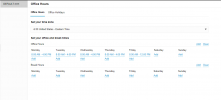
Here are the set office hours.

Screenshot 2024-06-26 173806.png


This is me testing out the user-level setting, which also didn't work.
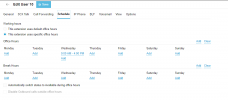
Screenshot 2024-06-26 173830.png

I've confirmed the time zone is set correctly. This is also a server conversion from v18 to v20. I've even gone as far as deleting the schedule and re-creating it to ensure it was updated under v20 - no change.

Any help would be appreciated.
 
The issue is with direct calls to the extension or globally to the PBX?
 
The issue is with direct calls to the extension or globally to the PBX?
Calls to the DID/Ext.

Calls to the main line which flow to a DR are working correctly with the office hours on/off, no issue.
 
What is the status of the extension?
Can you call it internally?
 
It’s set to available, and yes, it’s reachable by another extension without issue by extension to extension dialing.
 
Can you please delete, press save and re-create the office hours of the extension?
 
I have set the times of the system and extension directly, and calls will still pass through on a DID. Is there something I am missing?


View attachment 42184


I've confirmed the time zone is set correctly. This is also a server conversion from v18 to v20. I've even gone as far as deleting the schedule and re-creating it to ensure it was updated under v20 - no change.

Any help would be appreciated.

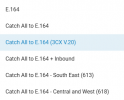
I had a similar situation, whereby incoming calls to a specific DID where meant to go to a diffent Ring Group, but instaed were going to the main (reception) RG. I found that there is a new setting at my SIP provider that needed to be set:

1720405640783.png
Apparently The E.164 conversion wasn't doing it correctly and therefore the DID wasn't recognised and routed accordingly.
I'm in Australia, your SIP provider might or might not have a similar option. Otherwise, this might give you a starting point to track what is happening and maybe use CLI reformatting(?).

Cheers
 
I moved this number to a ring group and set myself as the only member of the group. The call flow is working as expected now.

Sucks that v20 is causing weird issues like this, I didn't have with v18.
 
Status
Not open for further replies.

Latest Posts

Forum statistics

Threads
111,952
Messages
589,893
Members
164,843
Latest member
sambannoura