Can’t configure T46U as router with hosted instance

Shant592

Trial User
Joined
Apr 24, 2025
Messages
1
Reaction score
0
Hi everyone. We have a yealink T46U with latest firmware. Our instance is hosted, V20. I can’t for the life of me figure out how to configure this as a router phone. I put in the Mac address when adding the phone under user and I select connect to it directly. And it does show up, but the local IP field is blank. It shows up as red. The phone kind of provisions. The Admin password changes in the wallpaper updates, but I never fully registers Am I missing a step or a setting? We are multi site and one site already has an SBC running, we want to switch that as well over to a T46 once we figure this out.
 
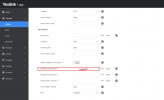
You can check that the IP phone is restarted to obtain the local IP address under the phone's Outbound Proxy Server settings :

1745519176120.png
 
Triple check you have the latest 3cx firmware. Also check for blocked ip's.
This is most definitely a firmware problem.
 
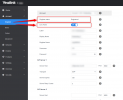
@Gingerr6 if you go on the web interface of the phone, on the Account >> Register, do you see the Line Active ON ?
Also does the PBX have a 3cx FQDN or a custom one ? If you have a custom one, is this trusted by the phone ?


1745566069230.png
 

Members Online Now

Forum statistics

Threads
111,835
Messages
589,291
Members
164,668
Latest member
Infinity Network