Solved can not access voicemail

Status
Not open for further replies.

gtcldn

Premier Customer
Joined
Feb 12, 2022
Messages
27
Reaction score
3
Hi everyone,

I have clients who have informed me that they have been able to access their voicemail on the desk phones, when they dial 999 we get a "destination is not available, not register or there are no routes available". It was working before and not it doesn't. anyone have the same issue? i have looked on other forms but so far i haven't found anything.
 
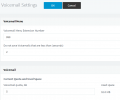
First thing I'd check is make sure that 999 is actually set as the Voicemail extension number. Access the Management Console and go to "Settings >> Voicemail", what's "Voicemail Menu Extension Number" set to?
 
First thing I'd check is make sure that 999 is actually set as the Voicemail extension number. Access the Management Console and go to "Settings >> Voicemail", what's "Voicemail Menu Extension Number" set to?
its set to 999
 

Attachments

  • voice.png
    voice.png
    44.1 KB · Views: 30
In that case we'll need to narrow this down:

• What's the digit length of this PBX?
• Does this happen for all users or just some, or just IP Phones? If only IP Phones, can you test the same extension(as the one on the IP Phone) but via webclient?
• If go to "Dashboard >> System Extensions" can you see Voicemail Service 999 as registered?
 
length 3 digits, and happens to all and just noticed its showing as not registered
 

Attachments

  • not reg..png
    not reg..png
    12.1 KB · Views: 22
i will be doing a restart after hours and update if this works
 
  • Like
Reactions: ChrisC_3CX
In that case, could you provide the following info:

• What exact version of 3CX are you running: Check under "Dashboard >> Information >> Version/License"
• What OS is the PBX running on (Windows Server 2019, Debian 10, etc)
• Can you see any other unregistered system extensions?
• Can you go to "Dashboard >> Services" highlight the Database Server and restart it then check again? Do bear in mind that I recommend doing this during out of office hours as it WILL render the PBX temporarily unavailable and will drop any ongoing calls.
 
late update, i restarted 3cx and voicemail is now working
 
  • Like
Reactions: ChrisC_3CX
Brilliant! Happy to hear you managed to sort this out!

I'll be marking this as solved so please do let us know if anything else comes up by starting a new thread!
 
Status
Not open for further replies.

Forum statistics

Threads
111,974
Messages
590,081
Members
164,899
Latest member
mazet