Cannot add IP phone to user extension

Cybergenix

SMB User
Joined
Jan 20, 2025
Messages
7
Reaction score
1
Hi,
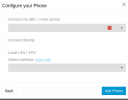
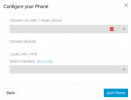
I have created a new user ext, and am trying to add an IP phone. I enter the phone type and mac address - I then only get the option to click on next. On the next screen, everything is greyed out so I am unable to continue.
1737388817173.png
Clicking on "Add Phone" fails as none of the options are filled out.

Any help appreciated.

Regards,
Leslie
 
You need an SBC or routerphone to connect to SMB.
 
  • Like
Reactions: DimitrisL_3CX
Hello @Cybergenix

In SMB installations you will need to first add an SBC or provision a Router Phone. Then you will be able to provision IP phones behind the SBC/Router Phone.
You can see the available supported IP phones that can be Router Phones in our guide Supported IP Phones
Also, see our guide Installing a 3CX SBC (Session Border Controller) for more information on how to install an SBC.
 
  • Like
Reactions: bitn2
Hi @Dimitris_3CX

This is in the 3CX console and you can't even update it there. This is before we looking to plug in the border switch or router phone we are looking to provision the phones individually as there are only 2 on premice
Thank you for your assistance thus far
 
Before a phone is provisioned it should be on the latest supported firmware. You can get the firmware files for each phone at https://www.3cx.com/docs/phone-firmwares/

Not all phones can be used as router phones. This is dependent on the hardware version of a phone. It is just down to the hardware capabilities.

If you have a router phone selected, you will see the Connect Directly option available.

Alternatively, you can install a 3CX SBC at the site, to connect your phones to the PBX.
 
Hi Nicholas,
Sorry, but I am confused. Before I even have the chance to create a router phone or sbc on site, surely I must be able to to configure the ip phone mac address etc in the user extension configuration?
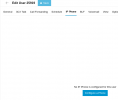
here on the IP phone tab:
1737470840506.png
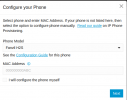
Clicking here, Then I get to configure a phone:
1737470893616.png
It does not matter what option I select here, when I click on next, everything is greyed out
1737470957529.png

Is this configuration not done before any ip phone is even connected to the network?
Thanks for the help so far.

Regards,
Leslie
 
Hi Nicholas,
Sorry, but I am confused. Before I even have the chance to create a router phone or sbc on site, surely I must be able to to configure the ip phone mac address etc in the user extension configuration?
here on the IP phone tab:
View attachment 46080
Clicking here, Then I get to configure a phone:
View attachment 46081
It does not matter what option I select here, when I click on next, everything is greyed out
View attachment 46082

Is this configuration not done before any ip phone is even connected to the network?
Thanks for the help so far.

Regards,
Leslie
 
You need an SBC or Routerphone with the correct firmware! That's why everything is grayed out.
 
  • Like
Reactions: JohnS_3CX
Hi bitn2
Please bear with me.
all the documentation I have read (https://www.3cx.com/docs/manual/ip-phones/ and others) say step 1 is to configure the IP phone in the user extension settings. After that config, 3CX is supposed to show the provisioning url etc.
Only after that, to connect the phone. I cant understand how the phone will get its initial config unless the extension is already configured with the mac address?

Regards,
Leslie
 
ok, so at step 2, I need to select the top option: "Connect via SBC/Router phone"?
 
  • Like
Reactions: fxbastler
Yes, that's right. This has already been written here several times.

Since your Fanvil H2S is not a router phone, you need to have an SBC or another router phone set up beforehand. Only then can you select it under SBC when setting up your H2S.

See also step 3 here: 3CX is in the cloud
https://www.3cx.com/sip-phones/fanvil-hotel-series/
 
Thanks for all the guidance guys - appreciate it
 

Members Online Now

Forum statistics

Threads
111,832
Messages
589,283
Members
164,662
Latest member
DejanMDS