- Joined
- Apr 6, 2022
- Messages
- 3
- Reaction score
- 0
Hey all!
Relatively new to SIP and 3CX, I understand the basics but that's about it. I am having trouble with my calls going through my SIP trunk *sometimes*. One minute, it will work fine. The next? Nothing at all.
I am using 3CX version 18.0 Update 3 (Build 461) and a Fanvil X3U with the correct supported firmware for 3CX.
I followed the Amazon Chime Voice Connector guide here and firewall checker is passing, but still it's hit and miss.
My outbound rule is set so that anything with a 9 in front is forwarded to the outbound rule, stripping 1 digit (the 9) and adding a +1, making the phone number +19990009999.
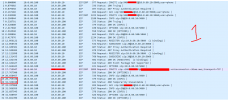
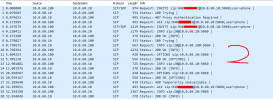
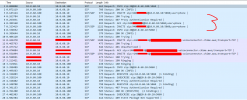
I took PCAPs from the phone system and the screenshots from them are attached. Numbers 1 & 2 are failed calls, 3 is a successful call (not even 15 seconds after the 2nd failed call).
Please let me know if any of y'all have any idea what's causing this spontaneous behavior.
Relatively new to SIP and 3CX, I understand the basics but that's about it. I am having trouble with my calls going through my SIP trunk *sometimes*. One minute, it will work fine. The next? Nothing at all.
I am using 3CX version 18.0 Update 3 (Build 461) and a Fanvil X3U with the correct supported firmware for 3CX.
I followed the Amazon Chime Voice Connector guide here and firewall checker is passing, but still it's hit and miss.
My outbound rule is set so that anything with a 9 in front is forwarded to the outbound rule, stripping 1 digit (the 9) and adding a +1, making the phone number +19990009999.
I took PCAPs from the phone system and the screenshots from them are attached. Numbers 1 & 2 are failed calls, 3 is a successful call (not even 15 seconds after the 2nd failed call).
Please let me know if any of y'all have any idea what's causing this spontaneous behavior.