Cannot hear calls on Web client in Chrome

Status
Not open for further replies.

FuTech-Nel

Bronze Partner
Advanced Certified
Joined
May 25, 2020
Messages
82
Reaction score
3
I have a user who is using the web client on Windows 10 on Chrome on her PC at home and she has a Bluetooth headset paired to the computer.

But when she receives a call, she cannot hear anything.

Is there a setting that needs to be changed?
 
Use the Windows app or Edge Chrome, there seems to be issue with the sound using the extension. Some users are reporting sound issues. Thanks.
 
Hi @FuTech-Nel

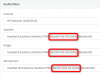
Once the bluetooth headset is paired, it should show up in Windows as an audio device.

You might see it appear twice: Once as a "Stereo" device and once as "Hands Free" device which usually has the suffix AG Audio at the end.

In the webclient, you need to select the one with the AG suffix (denoting headset mode) and also select it as the mic. This should very likely make it work.
1604482974628.png


Note that bluetooth is generally a bit hit and miss on Windows when using bluetooth comm. devices though, the same methodology may produce better results on some than others.
 
Last edited:
Status
Not open for further replies.

Forum statistics

Threads
112,349
Messages
592,026
Members
165,512
Latest member
gmacinit