can't add or edit DIDs

Status
Not open for further replies.

zeeb

Gold Partner
Advanced Certified
Joined
Mar 31, 2019
Messages
16
Reaction score
4
since the latest update to Version 20.0 Update 2 (Build 715 Release) i'm unable to save my changes on the DID settings page on one of our 3cx systems. it's impossible to edit an existing entry or add a new DID.
The Save button changes from light to dark blue, but doesn't react to clicks.
any idea what could cause the problem? i don't get an error message.
 
I'm unable to edit a generic SIP trunk at all. I select edit and it takes me to my extension.
 
I'm unable to edit a generic SIP trunk at all. I select edit and it takes me to my extension.

Delete and recreate your SIP Trunk, as it contains some values that are no longer allowed.
 
  • Like
Reactions: CentrexJ
Was this a Generic sip trunk or a previously imported custom sip trunk template?
 
I'm unable to edit a generic SIP trunk at all. I select edit and it takes me to my extension.
That's a known problem which can be solved by re-importing the settings file for your sip provider:
https://www.3cx.com/community/threa...settings-after-v20-upgrade.126096/post-596126
Ok, that doesn't help because you are adding an new sip trunk, after fiddling around we found the solution for this.

These are the steps to resolve this:
  • Under Admin, Voice and Chat, locate the trunk with the issue.
  • Click on the dots at the end and select export.
  • Rename the downloaded file to the xml filename located in the xml itself.
    • intellinet.pv.xml in our case.
  • upload the file to /var/lib/3cxpbx/Instance1/Data/Http/Templates/provider.
After this you can view and edit the sip trunk again.
 
Was this a Generic sip trunk or a previously imported custom sip trunk template?
Neither nor - it is an officially listed SIP trunk provider (AT netplanet). The trunk was already set up under V18. After the update to V20 there were no problems, only since the last SP have I had the problem
 
Have you tried in incognito mode?
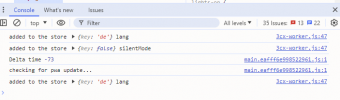
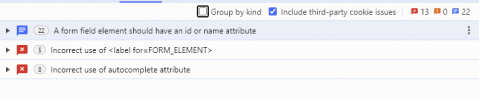
Also in dev mode on your browser you see any error in the console?
 
Yes - tried incognito and an other browser. Console has some errors - before i try to click the button. no additional errors when i try to save
1721855307899.png
1721855350097.png
 
Can you please create a support ticket so we can check this further?
 
I would have done that - unfortunately it is one of my systems with an NFR key.

If we can't solve it that way, I'll have to delete the SIP trunk and create a new one. Not so critical with this system. With a larger installation, that would be a disaster.
 
Understood, as a troubleshooting step try also to set the PBX in verbose and create a support info after you replicate.
Then check the management console log for any error that will give more information.
 
Status
Not open for further replies.

Forum statistics

Threads
111,952
Messages
589,896
Members
164,845
Latest member
tdzski5