Cant filter call logs by extension number

Status
Not open for further replies.

Grumbles

Bronze Partner
Basic Certified
Joined
Jul 19, 2019
Messages
14
Reaction score
2
Hi Everyone,

Im having an issue with an extension that has "Manager" rights to the management console.

When looking at the Call Logs, Filter > From: Ext or Range > type in 402 and get an error saying "Extension should contain 2 digits"1591665009582.png
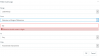
Im not sure what Im missing. That extension exisits and I dont have this issue with the root account.
I can search for that extension if I use the Number option though.

Thanks in advanced!
 
Are you on a 2 digit PBX or a 3 digit PBX?

It would seem that your are on a 2-digit system from the error message.

Please state:
- what version your PBX is
- what browser you are using
- whether the system was modified or had a backup restored from another system
 
Are you on a 2 digit PBX or a 3 digit PBX?

It would seem that your are on a 2-digit system from the error message.

Please state:
- what version your PBX is
- what browser you are using
- whether the system was modified or had a backup restored from another system

Hi JohnS_3CX,

Thanks for getting back to me.

We are on a 3 digit PBX

Please state:
- what version your PBX is
Running v16.0.5.612
- what browser you are using
Ive tried using Google Chrome and Firefox
- whether the system was modified or had a backup restored from another system
The system wasnt modified or backuped from another system
 
Thanks. Please try the following test for comparison:

  1. Make a new user, leave all settings default
  2. Give the new user exactly the same rights as the problematic extension
  3. Log in to the MC with the new user, and replicate the same scenario exactly as your screenshot
Lets see if the problem is isolated to that 1 user only.
 
Ive created a new user with the same rights all and Im still having the issue.
Is there a specific setting that im missing?
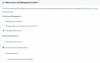
1591848892229.png1591848912494.png
 
No, everything looks good from here. Thanks for reporting this, we will investigate it further.
 
Hi there,

Has there been anyt update on this?

Thanks
 
Hi,

Yes this will be addressed in our next release.

If you wish to bypass the problem (temporarily until the next release) then give your user the additional right to "Generate Reports" and the problem will go away next time they empty their browser cache and then log in as usual.
 
Status
Not open for further replies.

Latest Posts

Forum statistics

Threads
111,953
Messages
589,915
Members
164,851
Latest member
DrunkeMeister