Can't get basic auth CRM integration working - but works in Postman

Status
Not open for further replies.

OTWQ

Premier Customer
Joined
Nov 22, 2022
Messages
5
Reaction score
1
Hi all,

I have been bashing my head against this wall for the last few hours and need to accept defeat at this point.

We are doing an integration with our custom CRM system, using basic auth, and it simply will not work. Our server is proxied by Cloudflare, which I thought would be the problem, however I have tested the query in Postman using basic auth and the GET parameters, and the response is correct. I can see the query coming through the Cloudflare logs so I'm sure that Cloudflare isn't causing issues.

When I upload the template and test in 3CX it simply doesn't work - I get an access denied error from our lookup function, which indicates that it is making the connection but not serving the auth header info. Things I've tried:

1) Doing the template over from scratch
2) Switching to no authentication, then adding the header manually in the XML using base64 encoded credentials.
3) Hard-coding the user/pass in the XML file instead of submitting them via the 3CX console parameters.

Same result each time. I've attached our XML file (with URLs redacted). Any thoughts appreciated.
 

Attachments

Hi all,

I have been bashing my head against this wall for the last few hours and need to accept defeat at this point.

We are doing an integration with our custom CRM system, using basic auth, and it simply will not work. Our server is proxied by Cloudflare, which I thought would be the problem, however I have tested the query in Postman using basic auth and the GET parameters, and the response is correct. I can see the query coming through the Cloudflare logs so I'm sure that Cloudflare isn't causing issues.

When I upload the template and test in 3CX it simply doesn't work - I get an access denied error from our lookup function, which indicates that it is making the connection but not serving the auth header info. Things I've tried:

1) Doing the template over from scratch
2) Switching to no authentication, then adding the header manually in the XML using base64 encoded credentials.
3) Hard-coding the user/pass in the XML file instead of submitting them via the 3CX console parameters.

Same result each time. I've attached our XML file (with URLs redacted). Any thoughts appreciated.
The ACCESS DENIED error you get, is it coming from your custom CRM or Cloudflare? If in your app, then you should be able to pull requests logs and see the headers sent to troubleshoot.
 
The access denied is from our CRM system. It's using the PHP_AUTH_USER and PHP_AUTH_PW variables which I believe are generated by PHP using the auth headers. When initiating the connection from 3CX, those headers aren't being passed on at all, they're just blank.
 
The access denied is from our CRM system. It's using the PHP_AUTH_USER and PHP_AUTH_PW variables which I believe are generated by PHP using the auth headers. When initiating the connection from 3CX, those headers aren't being passed on at all, they're just blank.
Hmm, the system should be using the Authorization header.
 
Can you show how you're configuring the request in Postman? That will give us some pointers on what you need to change on the template side...
 
  • Like
Reactions: Evolute IT
Can you show how you're configuring the request in Postman? That will give us some pointers on what you need to change on the template side...
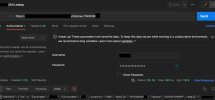
Yes, of course. I've attached a screenshot which shows how it's working (with URI and personal details blanked).

postman_snip.jpg
 
The template is configured to use Basic Authentication with the username and password, so that should be the same than what you do with Postman. Are you including any other header in Postman? It would be interesting to see the full HTTP request sent in one case and the other....
 
The template is configured to use Basic Authentication with the username and password, so that should be the same than what you do with Postman. Are you including any other header in Postman? It would be interesting to see the full HTTP request sent in one case and the other....
OK, that's great if you think the XML is accurate for what we're trying to do - I have spent ages experimenting with different authentication positions.

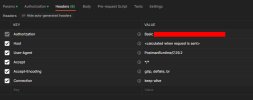
Here's the headers sent by Postman:
postman_snip.jpg

If the template looks good I'll try and see what logging I can get via the server and proxy and see if there's some clues there.
 
Hey, I've managed to make this work. I don't know if it's a config issue in our server (Apache), 3CX or what, but right now I'm just happy it works.

I didn't change any settings on our server or the 3CX server - all I did was amend the URL which was being called in our CRM integration template file from /3cxintegration/?phone=[phone] to /3cxintegration/index.php?phone=[phone].

I don't know why it worked in Postman but not 3CX, but there we go. Thank you for all your help and I hope this helps someone else.
 
  • Like
Reactions: edossantos
Hey, I've managed to make this work. I don't know if it's a config issue in our server (Apache), 3CX or what, but right now I'm just happy it works.

I didn't change any settings on our server or the 3CX server - all I did was amend the URL which was being called in our CRM integration template file from /3cxintegration/?phone=[phone] to /3cxintegration/index.php?phone=[phone].

I don't know why it worked in Postman but not 3CX, but there we go. Thank you for all your help and I hope this helps someone else.
That's an issue from your server side. Probably in the htaccess.
 
  • Like
Reactions: edossantos
Status
Not open for further replies.

Forum statistics

Threads
112,322
Messages
591,889
Members
165,470
Latest member
Robert Lee