Can't get Gigaset A580ip Setup as remote Extension

Status
Not open for further replies.

seanbts

Free User
Joined
Oct 12, 2010
Messages
34
Reaction score
2
Hi All,

Anyone any idea how to configure the A580IP as a remote extension?

Cheers
 
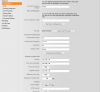
should be nice and easy, we have two of theses in service, all you will need to do is enter the public ip address in the correct boxes. Will do a screen shot for you tomorrow.
 
Hi Dave,

That would be great if you could put up a screenshot!

thanks a mill
 
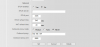
here you go

Replace 192.168.1.64 with your Public IP address of the 3CX server

if you need to use a stun server, put in stun.3cx.com
 

Attachments

  • ip.png
    ip.png
    40.5 KB · Views: 1,021
  • ip2.png
    ip2.png
    13.4 KB · Views: 1,021
Hiya Dave,

tried these with my public ip address but i get registration failed on both the gigaset phone and logs in 3cx. When i create the extension in 3cx do i need to enter in mac address as gigaset is not listed under the selected handsets?

In the advanced settings on gigaset , sip port is 5060 and the rtp ports are 9000-9049?

Thanks again
 
yes that sould work, we have theses phones in a few remote locations, however would not recommend them for business usage, they seem to break down within 6-9 months of usage.

no need to enter the mac address as the phones are not directly support by 3CX, however providing the both routers are setup correctly, you should have no issues.

can you install the 3CX softphone on a remote pc and see if you can make and receive calls ok?
 
Have it working now....had disable outside LAN ticked on the extension settings!

Thanks again!
 
ah right so you using the new V10 of 3CX :)
 
Status
Not open for further replies.

Forum statistics

Threads
111,865
Messages
589,461
Members
164,704
Latest member
cdl1