• We do not provide troubleshooting help for unsupported phones. Please try with a supported phone.
  • V20 Update 10 Alpha 2 Learn more

Can't get my Grandstream HT801 to work. Followed the instructions.

Status
Not open for further replies.

studman403

New User
Joined
Mar 1, 2022
Messages
4
Reaction score
0
Hi guys, I followed the instructions through 3CX to set up my Grandstream HT801 so I could use an analog phone with 3CX. I am using Skyetel as a sip trunk provider.

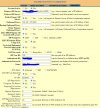
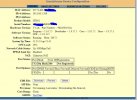
When I log into the grandstream unit, it says "Not registered". I used the setup file provided by 3cx after setting it up in 3cx (xml file).

If I pick up the phone I get a dial tone. If I try to dial out, I get a busy signal.

Any insight? Thanks in advance.
 

Attachments

  • gs1.JPG
    gs1.JPG
    91.7 KB · Views: 31
  • gs2.JPG
    gs2.JPG
    149.4 KB · Views: 28
Hi!

Can you start by upgrading the firmware to the latest as explained here?
https://www.3cx.com/voip-gateways/grandstream-ht-fxs/#h.8hbkg7oh1qys

FYI, as the firmware is quite old, read the Grandstream release notes because you may not be able to directly install the latest.

Once you do this, Factory Reset your device and try the provisioning from the beginning.
 
I tried upgrading the firmware to the latest version, kept giving me an error. I will try the second latest update and see if that helps. Thank you NickD!
 
I upgraded to the 2nd latest release. No change.
 
I got it working! Quality of call is just horrible though, same as my 3cx app. Any idea how much bandwidth it takes to make decent calls? I also set QoS in my router to priority #1 and reserved bandwidth.
 
Hi @studman403

The call quality depends on a few different factors, bandwidth being just one of them.

Does it cut out / have artifacts, or is it ok just sounds like low quality?
 
  • Like
Reactions: NickD_3CX
Hi!

Can you start by upgrading the firmware to the latest as explained here?
https://www.3cx.com/voip-gateways/grandstream-ht-fxs/#h.8hbkg7oh1qys

FYI, as the firmware is quite old, read the Grandstream release notes because you may not be able to directly install the latest.

Once you do this, Factory Reset your device and try the provisioning from the beginning.
It should be noted that the release notes state that the latest drivers cannot be installed by the method given in the 3CX instructions, namely, "Upload from local directory". The last firmware version to support this method is 1.0.31.1. Here is the cautionary note:
If HT80x firmware version is older than 1.0.33.4, users cannot use web UI option “Upload from Local Directory” to upload a firmware file equal to or newer than 1.0.33.4. Please configure web UI option “Firmware Upgrade and Provisioning” to set a valid method for the device to obtain firmware via TFTP/HTTP/HTTPS over the network.
Reference: https://firmware.grandstream.com/Release_Note_HT80x_1.0.35.4.pdf

On a device that is already configured and provisioned, a URL leading to the 3CX PBX is present in the corresponding field, e.g.:
Upgrade Via TFTP x HTTP HTTPS FTP FTPS
192.168.40.2:5000/provisioning/rdfrzibdf2ego/firmware/grandstream
However, there is no such folder—at least not on the PBX that I manage. Should this folder be created and populated manually, in order to provide the latest firmware as suggested?
 
Hi David,

If the manufacturer has made changes to the procedure recently, then it would be best to follow their instructions on how to do it.

We do not provide a method to do it via 3CX, I think that parameter was added way back just as a placeholder and was not really necessary. We might consider removing it entirely in the future (template originally provided by Grandstream).
 
Thank you for the clarification, @JohnS_3CX – I think I will give it a try with one of our devices.
 
  • Like
Reactions: JohnS_3CX
@David Liddle - Hello from the ILC in Dallas!

I had the same question about the path, but then I did some snooping around and found that "IP_Address:5000/provisioning/RandomFolder/firmware/grandstream" equaled "C:\ProgramData\3CX\Instance1\Data\Http\Interface\provisioning\RandomFolder\firmware\grandstream". I put the .bin files in this folder. This works great for our GXW4224 devices, but our HT801/HT802 devices tend to require a factory reset after being told to reboot to grab the latest firmware. (But then we also had one HT801 upgrade successfully, all on it's own! Go figure!)

Of course, this is on a self-hosted Windows VM, so your mileage may very if using a different platform.

- Barry
 
@BergtholdB – Hey there, Barry! It's been a while, eh? We'll probably be there in September for a few weeks.

@JohnS_3CX – I want to note that, if the 3CX PBX isn't going to check for and manage the firmware for these devices, as you stated, then I hope 3CX will remove all firmware-related settings from the provisioned information. That way, the operator will be free to set those without interference from provisioning. Getting my two HT801 units to upgrade was an adventure.
 
Thanks @David Liddle we will certainly take this into consideration in the next template revision
 
  • Like
Reactions: Evolute IT
Status
Not open for further replies.

Forum statistics

Threads
112,149
Messages
590,964
Members
165,170
Latest member
SupportRock