- Joined
- Feb 1, 2012
- Messages
- 4,134
- Reaction score
- 577
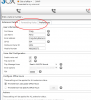
Anyone have the "Forwarding Rules" greyed out in MyPhone ?
This is not the "Hide Forwarding Rules" checkbox from the extension - I tried that. That actually removed the tab. This is just simply disabled. Also the "Actions" pane is disabled at the bottom, as is "Email Options" for Voicemail.
Workstation is Windows 7 Pro 64bit.
EDIT
====
Ok, so a reboot took care of this issue. Note, completely closing 3cx MyPhone; ensuring it was not running, then restarting it did not change this behavior.
This is not the "Hide Forwarding Rules" checkbox from the extension - I tried that. That actually removed the tab. This is just simply disabled. Also the "Actions" pane is disabled at the bottom, as is "Email Options" for Voicemail.
Workstation is Windows 7 Pro 64bit.
EDIT
====
Ok, so a reboot took care of this issue. Note, completely closing 3cx MyPhone; ensuring it was not running, then restarting it did not change this behavior.