Can't provision the Windows app

Status
Not open for further replies.

r831

Free User
Joined
Sep 19, 2022
Messages
7
Reaction score
2
I've been trying to log into the Windows 10 desktop app through the 3CX Web Client at my local connection, I can install the windows app normally but I can't log into the app because I hit the "Provision" button and nothing happens. I already added 3cx to my firewall, and the default protocol app is configured correctly. Also tried to get the URL but it didn't worked. What I should do?
 
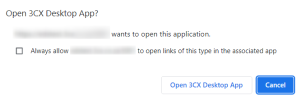
When you hit the "Provision" button, do you see the browser dialog asking you to launch the Desktop App?
1663617079149.png

Maybe you have a popup blocker for the web client?

What browser are you using?
 
  • Like
Reactions: Charles_3CX
I've been trying to log into the Windows 10 desktop app through the 3CX Web Client at my local connection, I can install the windows app normally but I can't log into the app because I hit the "Provision" button and nothing happens. I already added 3cx to my firewall, and the default protocol app is configured correctly. Also tried to get the URL but it didn't worked. What I should do?
What version of the Desktop Client are you using? Try removing the version you have and installing the latest version.
 
When you hit the "Provision" button, do you see the browser dialog asking you to launch the Desktop App?
View attachment 31973

Maybe you have a popup blocker for the web client?

What browser are you using?
I'm using Chrome. This pop up shows up normally.
What version of the Desktop Client are you using? Try removing the version you have and installing the latest version.
I'm using the latest version of the app. Downloaded straight from the webclient page. Also tried the older version and it didn't worked either
 
We're seeing the same thing. Able to log in to the web client. Clicking provision brings us over to the softphone, but getting a 401 unauthorized error.

We've tried "regenerate" on the users and still getting the same behavior.
 
Just resolved it. Not sure what went sideways, but making sure 3cx desktop app was fully closed was important before hitting provision. Check the systray and task manager to make sure all instances of 3cx desktop app are closed before hitting provision.

Not sure why this happened to begin with. It happened to two accounts that have been working all along. No changes to the user accounts, the server, or the clients.
 
  • Like
Reactions: r831
Just resolved it. Not sure what went sideways, but making sure 3cx desktop app was fully closed was important before hitting provision. Check the systray and task manager to make sure all instances of 3cx desktop app are closed before hitting provision.

Not sure why this happened to begin with. It happened to two accounts that have been working all along. No changes to the user accounts, the server, or the clients.
Just tried this here and it didn't worked too. I closed all files of the desktop app through the task manager, tried to hit provision and nothing happened again.
 
Same thing happening here for two completely separate clients, 3CX app is just launching to the 3CX logo and not allowing us to provision. Going to a 401 unauthorized error. We are able to provision in a sandbox, but anyone currently provisioned is giving us fits.
 
  • Like
Reactions: rkumar
Update to my previous "solution." Apparently that wasn't the only thing that was needed. We also updated to the latest version in the middle of that forray. Currently on 18.10.461 and the previous non-provisioning versions were 18.8.508

We silent deploy everything, but apparently a few of my users went through a reinstall process on the app install / provision screen. This through me for a loop initially because I've been working remotely through powershell and the reinstall switched the install to the user's context, not allusers... and I've been having a helluva time getting accurate install/version data out of powershell.
 
We're running version 18, update 5 and build 415
Not really offering up any help, but just wanted to say we're having the same problem and are on the same version.

Our instance had been working fine up until yesterday.
 
  • Like
Reactions: r831
This is happening to our clients that have been updated to V18.5, windows app stopped functioning for all of them with the "401 Unauthorized" error. Reinstalling the latest version of the Desktop app is the only way we were able to fix this....
 
  • Like
Reactions: JohnS_3CX
You were probably using an outdated version, but no worries this can easily be solved.

Server Side

1. Make sure your PBX is updated to V18 Update 5
2. If any new updates appear in the management console (for the 3CX apps) make sure they are installed


User Side

1. Uninstall the 3CX Desktop app from your PC
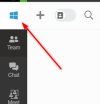
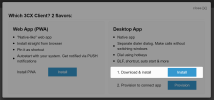
2. Login to your Webclient, click the app icon and the webclient will give you the latest fresh version.
1663769914286.png

1663769952361.png

3. After you install the latest app from here, you can finally click provision and it should work.
 
You were probably using an outdated version, but no worries this can easily be solved.

Server Side

1. Make sure your PBX is updated to V18 Update 5
2. If any new updates appear in the management console (for the 3CX apps) make sure they are installed


User Side

1. Uninstall the 3CX Desktop app from your PC
2. Login to your Webclient, click the app icon and the webclient will give you the latest fresh version.
View attachment 32024

View attachment 32025

3. After you install the latest app from here, you can finally click provision and it should work.
Thank you John for the info, it seems a lot of our clients did not update their Windows app when update 4 was installed. Would be nice if there was a way to force the update.
 
it seems a lot of our clients did not update their Windows app when update 4 was installed.
...which poses an interesting question: if one upgrades from u3 to u5, does the app self-update successfully? We had held off on u3 for clients but installed u4 for ourselves, so we can't test this scenario.
Would be nice if there was a way to force the update.
It should just need to be restarted...? Does logging off/on not update it? Did they ignore the banner at the top of the app since u4 was installed, or not get a banner?
 
...which poses an interesting question: if one upgrades from u3 to u5, does the app self-update successfully? We had held off on u3 for clients but installed u4 for ourselves, so we can't test this scenario.

It should just need to be restarted...? Does logging off/on not update it? Did they ignore the banner at the top of the app since u4 was installed, or not get a banner?
Regarding your question, you will need to uninstall the app from the computers, then use the webclient to re-download the new version, install it, and re-provision it.
 
Regarding your question, you will need to uninstall the app from the computers, then use the webclient to re-download the new version, install it, and re-provision it.
Hmm, thanks. :( Did not know all 3CX upgrades were mandatory in order like that.
 
Hmm, thanks. :( Did not know all 3CX upgrades were mandatory in order like that.
The issue is caused because some updates, for example, 3 to 4, it was not mandatory to update the desktop app for it to continue working. If though, the update was skipped by users pressing no when prompted, then the 3cx system updated to update 5, which now requires the latest version of the desktop app, then this issue occurs. It is, therefore, always best to update apps and systems when an update is available to avoid this type of issue in the future.
 
OK thanks. I started a new thread for that line of questioning.
 
Status
Not open for further replies.

Forum statistics

Threads
111,974
Messages
590,081
Members
164,899
Latest member
mazet