


- Joined
- Sep 20, 2019
- Messages
- 3
- Reaction score
- 0
Aloha,
This one seems a bit odd, and I've dug through the forums and associated info - hopefully someone can lend some advice.
Typically we host on DigitalOcean, but they were having an odd issue with Twilio, and forced us to set up one client on AWS. This was ~6 months ago, no issues since.
I've logged into the system countless times before, but we do run a VERY tight security setup, especially after the recent security incident @ 3CX.
Around the time of last login, I may have locked things down a bit too much, meaning to a singular dynamic IP from home, and not a range for our office (my only guess as to what caused this issue).
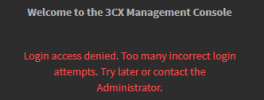
Now when hitting the WebUI, I immediately get:
What I've tried:
System is Linux Debian.
I'm tempted to update the IP list within the XML file, and restore that backup file from CLI.
I wish there was a straightforward way to simply edit the whitelist IPs outside of the WebUI.
Any other ideas, outside of a ticket with 3CX?
Cheers, -Ian
This one seems a bit odd, and I've dug through the forums and associated info - hopefully someone can lend some advice.
Typically we host on DigitalOcean, but they were having an odd issue with Twilio, and forced us to set up one client on AWS. This was ~6 months ago, no issues since.
I've logged into the system countless times before, but we do run a VERY tight security setup, especially after the recent security incident @ 3CX.
Around the time of last login, I may have locked things down a bit too much, meaning to a singular dynamic IP from home, and not a range for our office (my only guess as to what caused this issue).
Now when hitting the WebUI, I immediately get:
What I've tried:
- Logging in with the right password (it has not changed since last login - I'm the only one with it) - no go. (I've now confirmed the pass is correct, via the backup XML check)
- Using a VPN and whitelisting that IP in our AWS firewall - no go.
- Multiple logins with various wrong passwords, hoping to get the "reset your password" option - no go.
- SSH Tunneling into the system, forwarding local port 55,000 to 5,001, hitting it via HTTPS - go=no.
- Downloading a backup from the server via SSH - so I have a great recent restore point - worked.
System is Linux Debian.
I'm tempted to update the IP list within the XML file, and restore that backup file from CLI.
I wish there was a straightforward way to simply edit the whitelist IPs outside of the WebUI.
Any other ideas, outside of a ticket with 3CX?
Cheers, -Ian


