Solved Cause: 407 Proxy Authentication from wrong IP

Status
Not open for further replies.

kahodges

Customer
Intermediate Cert.
Joined
Feb 4, 2020
Messages
25
Reaction score
6
Customer has a static IP coming tomorrow. In the meantime, their IP has changed. The correct IP is showing in the PBX. Incoming calls are fine. Outbound throws 8/23/2021 12:26:57 PM - Call to T:Line:10000>>19414008944@[Dev:sip:[email protected]] from L:2.1[Extn:101] failed, cause: Cause: 407 Proxy Authentication Required/INVITE from 44.240.186.44:5060
which is their old IP. Any suggestions? Thanks in advance.
 
Have you tried to disable the sip trunk under SIP trunks, and enabling it again.

Is there a restriction with the sip provider to restricted access to certain ip's
 
The sip trunk is IP restricted, through Skyetel. I have told this customer multiple times to order a static IP or I could no longer help them. That finally got them moving. I have already left their office. As soon as I know the static info, I'll go out and set in the pbx and on Skyetel, and see what happens. I'll report back what happens. I did just disable the trunk and re-enabled it. Not going to call them to test it. It can wait. They have cell phones for outbound. The most important was inbound. Thanks.
 
The sip trunk is IP restricted, through Skyetel. I have told this customer multiple times to order a static IP or I could no longer help them. That finally got them moving. I have already left their office. As soon as I know the static info, I'll go out and set in the pbx and on Skyetel, and see what happens. I'll report back what happens. I did just disable the trunk and re-enabled it. Not going to call them to test it. It can wait. They have cell phones for outbound. The most important was inbound. Thanks.
Dyring souch operation, Please remember to charge the 3CX IP to Dynamic, and wait until the actual IP has changed. Herefter set back the IP to static again.
You find this under Settings / Network
This Will make it easy for you to change the IP, and you Will only have the SIP trunk IP change to think about.
 
  • Like
Reactions: ChrisC_3CX
IP is static now. Have green lights all the way across the board. Getting:

08/24/2021 9:56:07 AM - [CM503003]: Call(C:6): Call to <sip:[email protected]:0> has failed; Cause: 487 Request Terminated/INVITE from 127.0.0.1:5483
08/24/2021 9:56:07 AM - [CM503003]: Call(C:6): Call to <sip:[email protected]:0> has failed; Cause: 487 Request Terminated/INVITE from 192.168.1.104:5060
08/24/2021 9:56:07 AM - [CM503003]: Call(C:6): Call to <sip:[email protected]:0> has failed; Cause: 487 Request Terminated/INVITE from 192.168.1.105:5060
08/24/2021 9:55:00 AM - : Failed to create outbound lines to call 941xxxxxxx
08/24/2021 9:54:51 AM - : Failed to create outbound lines to call 565xxxx
08/24/2021 9:54:36 AM - : Failed to create outbound lines to call 565xxxx

Headed up there to run a pcap.
 
Inbound is still working. No outbound.
 
Just to better understand what is and isn't working.
Extension to extension calls are working OK.
Inbound calls via Skyetel are working OK.
Outbound calls via Sjyetel are NOT working?

I'd suggest what @jed said, go to Settings --> Network and now that you have the static IP, make sure you have correctly selected the option and set the correct IP.
If that's all correct, maybe consider deleting the SIP Trunk in 3CX and re-creating it.
Note that if you do this, all Inbound Rules will be removed as well, so make sure you remember what settings you had set on each one.
 
  • Like
Reactions: jed
Extension to extension works fine. I deleted the sip trunk, re-added it, set the outbound rules, and tried again. Somewhere in this mess, it keeps throwing in an old IP address. This is what the event log says:

08/24/2021 11:02:27 AM - Call to T:Line:10000>>19414008944@[Dev:sip:[email protected]] from L:13.1[Extn:101] failed, cause: Cause: 407 Proxy Authentication Required/INVITE from 44.240.186.44:5060

That is the old IP address from the day before yesterday.
 
Inbound calls are working fine.
 
Pulling another pcap now.
 
Going to back it up, and start over. Not seeing where this ghost IP is coming from.
 
Thanks for the help. I appreciate it.
 
From the trace I'm seeing Proxy Authentication Required, and AWS is replying to your new ip address.
What authentication have you set on the trunk, is it IP based? Maybe have a look at how authentication is configured in AWS?
 
Not using AWS. Running on a computer tower on Debian in the office. They don't want to pay for cloud use. I just installed Debian 10 with 3cx, and tried it with the backup, and getting the same error. I'm doing a fresh install without the backup now.
 
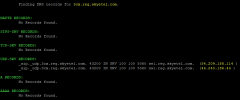
I just checked the IP Address 44.240.186.44 and it seems to be one of the IPs 3cx.reg.skyetel.com resolves to.
1629873081186.png

This is means that the error message you are seeing is telling you that your system is trying to make and Outbound Call and the Skyetel server is asking for authentication, which is failing.

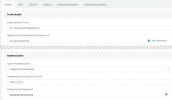
In the SIP Trunk settings for Skyetel, in the General tab, have you set the Authentication type to "Register/Account based" and put the username and password given to you by Skyetel?
1629873407122.png

Also, could you send a screenshot of the Outbound Parameters tab?
 
I would also restart the router/modem first as some times these devices do not update their public IP and keep sending the old IP until restarted.
 
I eventually went in to the Skyetel portal and created an authorization after testing it with a different trunk. Not sure why all of a sudden it started that, as I had originally set it to IP based when I first set this customer up, and never had an issue. Unless the customer went in there poking around, which you would never get them to admit that. Anyhow, it's running like it should now. Thanks for all the help.
 
  • Like
Reactions: YiannisH_3CX
Glad to see you got it fixed.
Just for reference "3cx.reg.skyetel.com" is the new Skyetel registrar for registration based trunks. IP based trunks would use "3cx.skyetel.com".
 
  • Like
Reactions: kahodges
Status
Not open for further replies.

Forum statistics

Threads
111,974
Messages
590,081
Members
164,899
Latest member
mazet