CDR Download/Grab From Cloud 3CX

Status
Not open for further replies.

kent3

Silver Partner
Joined
Nov 27, 2014
Messages
189
Reaction score
66
Hi Everyone

Probably a simple question but I'm struggling. We've migrated our 3CX to cloud, only issue I have is collecting CDR data (as live as possible) in notepad/excel format for our custom Wallboard software. I have read: https://www.3cx.com/docs/cdr-call-data-records/ but cannot figure out how to grab this data, what client do I use at my wallboard network to grab this data?
 
How did your wallboard get CDRs before you moved to a cloud instance? Can you elaborate a little on the data flows you need to make your wallboard function.
 
Hi,

You need any application that can read data from a port. Many software packages allow this, can't recommend anything specific because its a feature that is included in various packages made for various reasons.

It's just simple text, you can even telnet to that ip : port and the data appears as soon as a call is completed
 
How did your wallboard get CDRs before you moved to a cloud instance? Can you elaborate a little on the data flows you need to make your wallboard function.
We used to grab the data from a shared folder (notepad files) on the 3CX server as it was all local network and windows based. Our little software packaged, clocks an answered call by an agent, creating a leaderboard for calls answered.
 
Last edited:
Hi,

You need any application that can read data from a port. Many software packages allow this, can't recommend anything specific because its a feature that is included in various packages made for various reasons.

It's just simple text, you can even telnet to that ip : port and the data appears as soon as a call is completed
Thanks for the reply, is it still possible to grab the notepad files? Or just the raw data now?
 
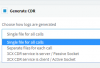
I was referring to using the PBX as a server with active/passive socket, but there are other ways too as you see below so the answer is yes you can pick it up as files too.

1583481697504.png

You can make separate files for each call if you wish and grab the files directly.
I imagine you would have to establish an SFTP session to the machine using the appropriate credentials, and pick up the files as they are being generated. This may be a bit slower than using the server/socket method.
 
  • Like
Reactions: kent3
According to the manual:

Configuring CDR to output to a socket in passive mode requires you to configure a port which is free on the 3CX Phone System Server. In this mode, 3CX CDR Service will act as a Server and will expect a CDR Client to connect to the IP:Port configured. This implies that you must allow data traffic to pass from your firewall in TCP Mode.

3CX CDR can send call data records to a CDR Central server. In this mode, 3CX CDR Service will act as a client and you need to provide the IP Address and TCP Port of the CDR Server that is handling your CDR Requirements.


The centralized CDR Server is a new feature (to me) that I have never tried. But if this works the way the old socket connection did, if the socket goes down (internet, network, or application issue), you will miss some transactions. Maybe for your application, that's not the end of the world, but in many scenarios, it can be an important consideration. To utilize this 3CX feature, you would need to write a service application that makes a resilient socket connection to handle the events. That's not all that straightforward.

As others have suggested, you could write (or perhaps purchase an existing application) that could connect remotely and periodically downloads the files, but you were looking for as close to real-time as possible. With this approach, you would need to constantly poke the 3CX server.

Another alternative would be to write a relay application that resides on the 3CX server and subscribes to the 3CX Call Control API to get real-time events, but that's a huge undertaking.

Alternatively, you could use our VoIPTools API to subscribe to CDR events. We have a CDR event that provides the contents of the new CDR file as a json object. These events are real-time (as soon as the file is created), but remember the files are not created until the call is ended. If you want actual real-time events when the call is started (rather than waiting for the call to end) you can subscribe to the actual 3CX events using our API.

I should point out that we also support the old-school approach for getting a list of files, downloading individual files, renaming files, and deleting files -- essentially recreating what you did when your PBX was on-prem.

Lastly, we have an Exporter tool that can automate the whole process of subscribing to the real-time CDR events, parsing the files, and placing the data right into a database. You wouldn't have to do anything, it would just happen. Exporter can even catch up if you have a temporary outage that interrupts the real-time events so you never miss a transaction.

From my perspective, it's certainly possible to build tools to recreate what you did previously when your server was on-prem, but every alternative requires a degree of effort to automate. If you don't want to build a solution yourself, we have tools that automated the entire process for you.
 
  • Like
Reactions: kent3
According to the manual:

Configuring CDR to output to a socket in passive mode requires you to configure a port which is free on the 3CX Phone System Server. In this mode, 3CX CDR Service will act as a Server and will expect a CDR Client to connect to the IP:port configured. This implies that you must allow data traffic to pass from your firewall in TCP Mode.

3CX CDR can send call data records to a CDR Central server. In this mode, 3CX CDR Service will act as a client and you need to provide the IP Address and TCP Port of the CDR Server that is handling your CDR Requirements.


The centralized CDR Server is a new feature (to me) that I have never tried. But if this works the way the old socket connection did, if the socket goes down (internet, network, or application issue), you will miss some transactions. Maybe for your application, that's not the end of the world, but in many scenarios, it can be an important consideration. To utilize this 3CX feature, you would need to write a service application that makes a resilient socket connection to handle the events. That's not all that straightforward.

As others have suggested, you could write (or perhaps purchase an existing application) that could connect remotely and periodically downloads the files, but you were looking for as close to real-time as possible. With this approach, you would need to constantly poke the 3CX server.

Another alternative would be to write a relay application that resides on the 3CX server and subscribes to the 3CX Call Control API to get real-time events, but that's a huge undertaking.

Alternatively, you could use our VoIPTools API to subscribe to CDR events. We have a CDR event that provides the contents of the new CDR file as a json object. These events are real-time (as soon as the file is created), but remember the files are not created until the call is ended. If you want actual real-time events when the call is started (rather than waiting for the call to end) you can subscribe to the actual 3CX events using our API.

I should point out that we also support the old-school approach for getting a list of files, downloading individual files, renaming files, and deleting files -- essentially recreating what you did when your PBX was on-prem.

Lastly, we have an Exporter tool that can automate the whole process of subscribing to the real-time CDR events, parsing the files, and placing the data right into a database. You wouldn't have to do anything, it would just happen. Exporter can even catch up if you have a temporary outage that interrupts the real-time events so you never miss a transaction.

From my perspective, it's certainly possible to build tools to recreate what you did previously when your server was on-prem, but every alternative requires a degree of effort to automate. If you don't want to build a solution yourself, we have tools that automated the entire process for you.
Cheers for the detailed info Matthew! Brilliant!

I may be in touch (feeling lazy) :D
 
@kent3
Does your wallboard application require the 3CX CDR logfile only to have specific fields present or can it work with a file that contains all possible fields that 3CX can generate in a CDR?
 
Our wallboard doesn't use the CDR files at all, rather, we monitor the real-time events using the Call Control API. We are not limited to displaying only CDR information, you could display pretty much anything.
 
@kent3
Does your wallboard application require the 3CX CDR logfile only to have specific fields present or can it work with a file that contains all possible fields that 3CX can generate in a CDR?
Hi

In a nutshell

Our software currently reads the CDR files per call, grabs the desired data and outputs to a users box. As the file is in CSV format, we tell our software which parts of data we want to grab e.g. 1st field, 5th field, 8th feild
 
Do you mean 'Single file for all calls' or 'Separate files for each call' mode?
 
Do you mean 'Single file for all calls' or 'Separate files for each call' mode?
Separate files for each call mode
 
Our wallboard doesn't use the CDR files at all, rather, we monitor the real-time events using the Call Control API. We are not limited to displaying only CDR information, you could display pretty much anything.
Problem is, our client loves the leaderboard (league table) style, it was developed for him and him only, in-house. We currently have 2 league tables, side by side on a single large monitor on one micro PC, listing the amount of calls answered in the 2 queues
 
Kent3,

Since your leaderboard software was written specifically to parse the individual CDR files, it sounds like the least disruptive approach to the challenge is simply to find a way to download the raw files as you always have done.

I have to think there are programs out there you can purchase to make a remote SSH connection and download any new CDR files since the last synchronization. The key, however, is to automate this process and only download the new files.

Alternatively, you could use our API to download the files, or our Exporter tool to automatically process the CDR files and put the data directly into a database.

Separately, I will point out that our commercial Competitive wallboard is a leaderboard.
 
@Cjay Thanks for all of your help with this, your software saved me hours of head scratching and works beautifully, exactly what we were looking for. Highly recommend!!!!!
 
Glad to have been of assistance. Just for the forum record, the solution was a custom variant of CallVitesse (the 3CX CDR buffer/relay program more usually employed with the CallSequitur CDR analysis package).
 
Is this making a socket connection? If so, then there is the potential to miss calls if the service is down, right? Or is this some kind of file synchronization tool that can authenticate remotely? Just curious.
 
Status
Not open for further replies.

Latest Posts

Forum statistics

Threads
111,939
Messages
589,843
Members
164,824
Latest member
Xeniosg