CDR Format using default settings - how do I interpret the file name?

Status
Not open for further replies.

greychain

Gold Partner
Advanced Certified
Joined
Jul 13, 2018
Messages
779
Reaction score
122
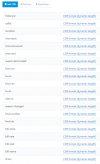
Here is an example of a CDR file record name. I was expecting it to be different based on the fields included in the CDR output I selected .

How do I get the details of the fields I selected?

At a guess I would go for CRM record name and number_incoming call number_final extension call answered_datetiimestamp.wav

[Barry%3A012620441]_012620441-8100_20210520031641(4).wav

%3A = :


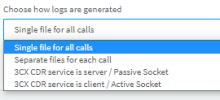
What is the difference between the two service choices? Which one will ensure I don't loose data?

Are these details sent in the other methods?
1621481215738.png
1621481063489.png
 
The file you are referring to is actually a recording file and not a CDR file. When CDR is enabled and is set to write to a file on the 3CX PBX, a CDR log file is create in the following directory:

Windows: “C:\ProgramData\3CX\Instance1\Data\Logs\CDRLogs”
Linux: "/var/lib/3cxpbx/Instance1/Data/Logs/CDRLogs”

Every CDR log entry should contain values for the fields you specify under "Settings >> CDR >> CDR Output Fields". I suggest you have a quick look at our guide here: https://www.3cx.com/docs/cdr-call-data-records/
 
OK. So it's not a CDR log.

3CX Phone System has an inbuilt CDR Service that is able to log phone calls including a record that can be saved to a file, or pushed to another application instantly via TCP.

The record contains various call details such as time, date, duration, source and destination numbers as well as the cost. 3CX goes a step further adding much more information such as call-types, call information, From and To names and final display names crucial when call transfers occur.


What would happen if I wanted to access both the actual CDR log only available by the 3CX service and the location of the call file. How would I do that?
 
Well they are two separate things so you would have to access the CDR log file and the Management Console Recording section. I would recommend using Call Reports instead since it is essentially a Call Log with link to the recording file included.
 
So I'm writing an app that will track calls dropped from a queue, for which I will need to monitor the CDR logs via the service. I also require the app to record where the call recordings are stored. How can I get both sets of data?

I have asked the customer if he wants to wait until tomorrow for this information and he really wants it today.
 
If you want an easy and ready to go solution you might want to take a look at CallSequitur which provides a way of examining and analysing CDRs (though note this is nothing to do with call recordings).

For calls dropped from a queue (I guess you mean abandoned where the caller hung up) then you need to extract calls that went to queue but no further and where the termination reason was 'TerminatedBySrc'. If you define such calls as a CallSequitur 'Custom Call Type' then you can view these in 'near real-time' - i.e. once the call is terminated and the CDR is produced then the display is updated. The CallSequitur/CallVitesse solution makes use of the '3CX CDR service is server' or 'is client' mode which is extremely reliable.
 
I also require the app to record where the call recordings are stored. How can I get both sets of data?
If you're referring to the to the actual recording file, all recording files are stored in the same root folder, then in a subdirectory which is named after the extension that was involved. If it's and extension-to-extension call, the recording file will be in the subdirectory of either one or the other extension.

With this logic, you should be able to make an 'educated guess' from the CDR logs in which folder the recording file of a call will be.
 
And if it's a transferred call it's in the originating extension
 
I personally prefer to work with the CDR text files. If your IP socket goes down for any reason, you lose the data and you can not recreate the lost data. It is not a question of whether the socket client is highly reliable. If there is a network blip or any other failure the data is gone. In contrast, if you process files, WHEN (because you know it will) the network or service goes down, no problem. When access is restored, you continue processing files where you left off.

There is the challenge of accessing the CDR files when 3CX is hosted in the cloud. In this case, you can automate the copying of the CDR files with an SSH client, or using a tool like our 3CX Exporter which can automatically process the CDR files and put the data into a SQL or MySQL database

Matching recordings to phone calls is not a "perfect" process, but is generally workable. 3CX does not provide any direct ties (unique identifier) to help match a recording to a specific call, but you can make an educated guess. The CDR file contains the start time for the call. The recording file creation date/time (OS file property) should be the same (I have seen some variation between the call start time and the creation time of a few seconds). Since an extension can only record one call at a time, there should only be one recording with the same, or similar start date/time.

Alternatively, the recording file also has the date/time embedded in the file name. Be aware, however, that this date/time is in UTC. This can also be used if, for example, the recording files were moved at some point in the past. Moving the recordings from one location to another will typically change the OS's file creation date/time. If this is the case, then you will need to fall back to the date/time embedded in the file name.

If you are needing to process really old recordings, I think it was around the time period of 3CX V12/V14, 3CX changed how dates were represented in the recording file name. Old recordings will have an embedded date/time that is in "local time" and newer recording file names will represent the date/time in UTC. Yes, that makes things a little more complicated.

Some people have used the CallD to link the call and the recording together. Keep in mind that the CallID is NOT unique. Every time you restart your 3CX server, the CallID is reset back to 1. So you will need to look at the date/time of the file and further match using the CallID to ensure you are matching the correct file.

For the sake of completeness, there is a table in Postgres that could be used to match the recording to the call, but accessing the Postgres database will instantly flag your PBX as "unsupported" by 3CX. Therefore, I strongly urge you to use other approaches to matching the recording file to the correct call.
 
  • Like
Reactions: Evolute IT
Great info, thanks
 
Status
Not open for further replies.