Cell Apps Suddenly Not working

Status
Not open for further replies.

AllianceLaundry

Customer
Joined
Apr 27, 2020
Messages
25
Reaction score
1
Issue: IOS and Android Apps are no longer working. You can provision, but they just say Ready for Calls but the status stays Grey and there is no information from Presence and you cannot call out or get calls in. Prior to a couple days ago they were working perfectly. Randomly stopped working and weirdly yesterday my phone turned on for maybe an hour then stopped working again.

All Deskphones work great. Nothing at all has changed in between them working and not working(At least that I know of, the Android app or server could have got an update).

I have checked all ports in the firewall, enabled DMZ just to see if that would help. Changed Firebase account.

Also, if I am on the server wifi then the app works, but if I'm on another wifi or Cellular then it does not work.

Help please!
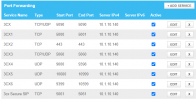
 
your external ip address hasn't changed?
 
RTP port range should be only one rule from port 9000 to 10999 UDP
 
RTP port range should be only one rule from port 9000 to 10999 UDP
I fixed that. Didn't fix the problem unfortunately.
 
Is your license current? What version?
 
where is your PBX ? on premise ? cloud?

3CX firewall checker passes green?
 
where is your PBX ? on premise ? cloud?

3CX firewall checker passes green?
Local on premise on a raspberry pi 4. Firewall checker passes all green. Current license that doesn't expire for 2 more months(professional) 16.0.1078
 
Hey @AllianceLaundry,

Just to clear things up first, you say that the apps provision, do you mean when using the attachment of the welcome email?

The fact that they work locally but not remotely hints that this may very well be a firewall configuration issue.

I see you have both TCP port 5001 and 443 forwarded to the same IP, which one did you actually use as the HTTPS port of 3CX? You could check this by accessing the Management Console, navigate to Extensions >> Edit an Extension that has a remote phone(SBC or STUN) configured on it, go to Phone Provisioning and check the Port in the Provisioning Link under IP Phone.

Once you have confirmed the HTTPS port, try accessing the Management Console from a remote location using that https port. Are you able to connect?

Also, what versions of the 3CX Android and iOS apps are you running?
 
In addition to what my colleague said, also try fixing this to 5001 5001
1612256867892.png


5000 should not be forwarded externally
 
Hey @AllianceLaundry,

Just to clear things up first, you say that the apps provision, do you mean when using the attachment of the welcome email?

The fact that they work locally but not remotely hints that this may very well be a firewall configuration issue.

I see you have both TCP port 5001 and 443 forwarded to the same IP, which one did you actually use as the HTTPS port of 3CX? You could check this by accessing the Management Console, navigate to Extensions >> Edit an Extension that has a remote phone(SBC or STUN) configured on it, go to Phone Provisioning and check the Port in the Provisioning Link under IP Phone.

Once you have confirmed the HTTPS port, try accessing the Management Console from a remote location using that https port. Are you able to connect?

Also, what versions of the 3CX Android and iOS apps are you running?
- If I scan the QR code on mobile network it just continues to say No Active Profile, If I download the file it works but but then it just shows Ready for Calls in Grey with no Status for other lines, no incoming or outgoing calls work.

- We don't have any SBC or STUN phones. All phones are either in-office using the Local Lan Option, or it is cell phones in the field.

- I can access the management console remotely using https://alliancelaundryequipment.3cx.us/ but if I add the port like https://alliancelaundryequipment.3cx.us:5001/ then it won't connect.

- 3CX on android is 16.7.0.23, ios is 16.1.6.106
 
- I can access the management console remotely using https://alliancelaundryequipment.3cx.us/ but if I add the port like https://alliancelaundryequipment.3cx.us:5001/ then it won't connect.

This means your HTTPS port is the SSL default port 443 (you are not using 5001). It also means that the port forward for 443 is working correctly.

So let's then try the following

  • Access your management console using that link without the port number, and create a brand new extension leaving everything default
  • Give it it a name and press OK to save
  • Then edit that extension again so you have the QR code in view
  • Pull up your mobile device disable WiFi, and enable only LTE
  • Delete and reinstall the app so we can start fresh, then scan the code using your mobile now

Let us know how this goes, and in case it fails, try scanning the code with a different device.
 
This means your HTTPS port is the SSL default port 443 (you are not using 5001). It also means that the port forward for 443 is working correctly.

So let's then try the following

  • Access your management console using that link without the port number, and create a brand new extension leaving everything default
  • Give it it a name and press OK to save
  • Then edit that extension again so you have the QR code in view
  • Pull up your mobile device disable WiFi, and enable only LTE
  • Delete and reinstall the app so we can start fresh, then scan the code using your mobile now

Let us know how this goes, and in case it fails, try scanning the code with a different device.
Very weird...that worked. The consoles look different in that the extensions all show as dark using the web console with no port, and the local console shows them all active but neither show anything created since about a week ago. I created the new extension as you asked and my mobile now works perfectly, though not seeing anything attached to the other port version.

What would have caused it to suddenly change and how can I get it 'back' to normal?

* Each Console shows a different Network IP and a Different Static IP even though we only have one server, one nic card.
 
I suspect that you are looking at two different PBXs, both competing for the FQDN.

Sometimes you will end up in one, sometimes in the other depending on which of the two last updated the DNS records.

This is the first thing to check before you do anything else, find the rogue machine and shut it down.
 
I suspect that you are looking at two different PBXs, both competing for the FQDN.

Sometimes you will end up in one, sometimes in the other depending on which of the two last updated the DNS records.

This is the first thing to check before you do anything else, find the rogue machine and shut it down.
That's what happened. Apparently, our google cloud version turned back on and pinged back to 3cx. Just weird that it worked all as it should for 1-2 months then suddenly changed.

So the problem is that the 3CX customer portal shows that the FQDN IP got changed back to the google cloud. I can see where to change the FQDN but cannot find where to change just the IP.
 
Ok so once the "rogue" machine has been switched off, your main machine should be able to reclaim the the FQDN by going to

Settings >> Network >> Public IP >> External IP Configuration >> Set to "Dynamic" and press OK

After a while a this will take care of the issue, and you can switch it back to Static again.

You can verify this by trying to use your FQDN again, but you don't know which port the other server has so try after half an hour with both port 5001 and without it.
 
Status
Not open for further replies.

Members Online Now

No members online now.

Forum statistics

Threads
111,832
Messages
589,284
Members
164,662
Latest member
DejanMDS
