Solved Cert Fail due to 3CX retiring *3cx.co.uk without notice. How change the FQDN?

Status
Not open for further replies.

ACR123

SOHO User
Joined
Jul 16, 2024
Messages
6
Reaction score
1
Hi folks

Started the day with a certificate error. No prior errors/failures of certification failure etc.

Research shows that 3cx have retired our *.3cx.co.uk domain. There was no communication about this???

How can I change to another FQDN? such as *.3cx.uk etc

Any help would be appreciated

Best wishes
 
Your FQDN is still active, but it is just the certificate that has expired this morning.

The 3cx.co.uk domain is not available for new registrations. Since you already have this you are safe.

Did you get an email stating the SSL failed to update and what was the reason given?

The update procedure generally starts a month prior to expiration.
 
Thanks for the reply Nicholas and thanks for the clarity on the domain name too.

Last email re certification was on 06/12/24 - which was successful. No other emails regards to certificates (I do receive other 3cx emails as expected).

No changes to the network or firewall(s) - all open correctly. Firewall tests within 3cx are all ok too.

Is there anything I can check?

Thanks, Alan
 
You can try this on the the server

 
Thanks Nicholas

Ran the command with a CMD prompt with Admin rights. Asked if wish to run using 1 a web browser or 2 command line.

I selected option 1, web browser opened with heading:
"Configure your 3CX Install" with options
Upload a new Configuration file created on 3CX or
Restore a backup?

Can you advise?

Alan
 
Last edited:
did you add the -renew-certificates at the end?
 
Thanks - Copy and paste character...

Receive the following error:

nginx: [warn] duplicate network "::0/0", value: "0", old value: "1" in C:\Program Files\3CX Phone System\Bin\nginx/conf/nginx.conf:32
nginx: [error] OpenEvent("Global\ngx_reload_4204") failed (5: Access is denied)

Alan
 
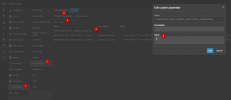
Did you add the parameter in the PBX Parameters?

TEMPORARY_SELF_SIGNED_CERTIFICATE_GENERATED and set the value to 1

1741267344174.png
 
Yes, I made that change first. Steps:
1) I refreshed the page and checked that the value was still set as 1
2) Run the CMD command
3) After 90 seconds I receive the error as above
4) I checked and Parameter reset back to 0
5) I received an email "The SSL Certificate for your 3CX installation at xxxxxxxxxxx.3cx.co.uk was automatically renewed for the next 90 days. Your 3CX web server is now secure and all web traffic that passes via 3CX is encrypted."

Issue remains...

Alan
 
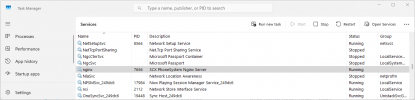
Could you restart the nginx service?

1741269468049.png

Also, have any changes been made to the nginx conf on the server?
 
  • Like
Reactions: ACR123
Nicholas - that has resolved.
What is odd though is that I also restarted the server and repeated the instructions too.

No changes have been made to this VM for sometime. It is only used for 3CX. It is set to auto updated

Thank you for your help.

Alan
 
  • Like
Reactions: NicholasP_3CX
Status
Not open for further replies.

Latest Posts

Forum statistics

Threads
111,964
Messages
590,000
Members
164,869
Latest member
hpgitsupport