CFD - How to pause and run API

Status
Not open for further replies.

NWE

SOHO User
Joined
Nov 1, 2017
Messages
3
Reaction score
0
Hi,
Sorry if this is the wrong location, I don't seem to have sufficient access rights to post in the CFD forum.
I have a CFD flow that sends an after hours emergency notification via the pushover app using their API call, it works fine.

When the user gets the notification, they have an "acknowledge" button on the app. There is another follow-up API call where I can query the status (0 or 1) of the acknowledgement (confirm that the message was received). I also have this working by sending out an email from the flow showing the status (its always "0" because the message was just sent).
How can I wait a period of time, say 10 minutes, then check for acknowledgement? Something in the disconnect handler? If not acknowledged in 10 minutes, I'll have the system notify a manager.

Thanks.
 
Hello NWE,

We use something that is almost the same thing, but not exactly the same
The first CFD you already have ready just need to 'save' the data (name/number/time/manager.. anything)

Than you need a CFD-DIALER to check the information every minute.
If any found, keep max count (let say, max 10x), that is 10 minutes, than this DIALER script can escalate to the Manager.

In our own script this will 'TRANSFER' the to another CFD that will CALL the service person and request an confirmation to press digit 8, if no confirmation the DIALER script will call every 4 minutes again and again (max 5 times), to make sure the service person 'on duty' will confirm the service request.

So in short it is a combination to make with CFD scripts to send messages / call people and a CFD-DIALER that does check every minute or so for actions to be taken, depending on saved data.

Hope this will help you with some idears, on how to get your personal sollution working.

Paulo
 
Hi Paulo,
Thank you, that makes sense. The part I'm stuck on is the timer part. How do you make the dialer wait XX minutes? I don't see a suitable block. I thought there was a "pause" block, but I cant find it.
 
Hello NWE,

There is no option to wait in the CFD.
So the CFD-script should save data and exit (terminate script).

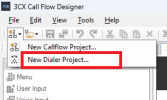
Another script should check every minute (or so), this type is not just a CFD, but a DIALER

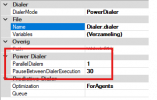
1769597800021.png 1769598027100.png

This type CFD-DIALER can be setup to check every 60 seconds and act on any data you have saved.

Paulo
 
  • Like
Reactions: KyriacosS_3CX
Hi Paulo,
Thank you, that makes sense. The part I'm stuck on is the timer part. How do you make the dialer wait XX minutes? I don't see a suitable block. I thought there was a "pause" block, but I cant find it.
In the dialer properties you can select how long it waits between executions. Otherwise, use a CSharp component to run a sleep command.
 
Using the dialer is a valid approach, but you need to share data between the call flow and the dialer, so it might become challenging.

Adding a pause / sleep in a C# script from the Disconnect Handler flow might be easier. Just use a Loop there, to iterate N times, and inside the Loop use an Execute C# Code component to make a pause, and then check the status again. In order to do the pause, you can use this C# code:
C#:
// Wait 10 seconds
Thread.Sleep(10000);
 
Status
Not open for further replies.

Members Online Now

No members online now.

Forum statistics

Threads
111,832
Messages
589,286
Members
164,662
Latest member
DejanMDS