CFD - Routing based on logged-in extensions

Status
Not open for further replies.

james_tech

Silver Partner
Joined
Jun 7, 2022
Messages
37
Reaction score
2
Hi all,

I am looking to create a CFD based on a Q. I would like to achieve if no one is logged into the Q, then choose a different path to the current failover destination.

IF 1 person or less is logged in then route to extension 200
IF 2 or more logged in then continue to the Q

Please can someone offer some assistance?
 
GetQueueExtensions will be your friend!
 
  • Like
Reactions: David_O
GetQueueExtensions will be your friend!
I have used this, but not sure what the next step would be? I am assuming a condition but what would be the condition string?
 
  • Like
Reactions: Evolute IT
You'd use the list of extensions returned to calculate a condition like:

GREATER_THAN(GET_ITEM_COUNT(component.ExtensionList), 2)

Which would be: if extensions list has more than 2 items (2 exts), then use the transfer component to send the call to either destination.
 
You'd use the list of extensions returned to calculate a condition like:

GREATER_THAN(GET_ITEM_COUNT(component.ExtensionList), 2)

Which would be: if extensions list has more than 2 items (2 exts), then use the transfer component to send the call to either destination.
Thanks, I am getting this error on the Call Flow logs:

Error executing last component: System.FormatException: String 'GREATER_THAN(GET_ITEM_COUNT(GetMotorwayQAgents.ExtensionNumberList), 2)' was not recognized as a valid Boolean.
 
You put it as a string with quotes. Remove the quotes but also check in the Expression Builder that I wrote the right function names lol
 
You put it as a string with quotes. Remove the quotes but also check in the Expression Builder that I wrote the right function names lol
Where would I put my Q though? GetMotorwayQAgents.ExtensionNumberList

GREATER_THAN(GET_ITEM_COUNT(GetMotorwayQAgents.ExtensionNumberList), 2)
 
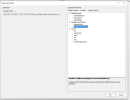
Yes and in the GetQueueExtension there's a property to set the queue number to check.
 
Yes and in the GetQueueExtension there's a property to set the queue number to check.
1661183485147.png
Sorry, but where am I looking? Can you adjust the code to fit our variable name please as I am getting confused lol
 
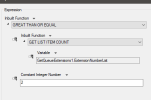
It should look like this in the expression builder:
1661191523515.png
And like this in the field (notice the quotes aren't there, so it is not considered a "string" but an expression) :
1661191563152.png
 
Status
Not open for further replies.

Latest Posts

Forum statistics

Threads
111,881
Messages
589,534
Members
164,738
Latest member
User0